
Introduction
In September 2025, we (Yichen and Sacha) joined Bugscale. For our first project, we teamed up with the goal of getting an entry into Pwn2Own 2025, in the mobile phone category. We targeted the Samsung Galaxy S25, the latest device in Samsung's flagship smartphone range at the time. The competition had to be held between October 21st to October 24th, and the registration deadline was set to October 16th, which meant we had a bit more than two months to come up with a 1-click RCE chain.
Unfortunately, on the day we were supposed to register for the competition, the bugs we had at the time didn't get us all the way there, so we decided not to register. Of course, after spending a bit more time working on an exploit, we managed to get a fully working exploit chain, missing the deadline by just a few days. The final exploit allowed us to install and launch any APK on a remotely accessible device, either over LAN or Wi-Fi Direct, starting from a single click on a malicious link: pretty nice!
In this blog post, we will go through the whole process, starting from the attack surface identification all the way to finding an arbitrary app install primitive in Samsung's data migration app. We will also cover a few detours we took along the way, as they still contain some interesting technical details.
Attack Surface Identification
To be eligible for the competition, we could target either a USB attack vector or a remote one. For the remote vector, the rules were the following, quoting the organizers:
A successful entry for the Remote vector must compromise the device by browsing to web content in the default browser for the target under test or by communicating with the following radio protocols: near field communication (NFC), Wi-Fi, Bluetooth, or Baseband.
Attacking the radio protocols would likely require some form of memory corruption primitive, which seemed a bit tight to pull off within the time we had. Also, looking at past entries, this didn’t appear to be the preferred attack vector. Instead, most of the entries we looked at targeted the browser: since the browser can open apps, it can potentially reach a large attack surface in the phone’s stock applications. This is possible as Android supports deep links, which allow functionality inside installed apps to be invoked directly. For example, clicking on the following link opens the Galaxy Store (Samsung’s equivalent of the Play Store) on the Game Home app install page:
samsungapps://ProductDetail/com.samsung.android.game.gamehomeAlso, by default, Samsung devices come with a lot of pre-installed apps:
$ adb -d shell pm list packages | grep -E 'samsung|com\.sec\.' | wc -l
     329
Some past entries already showed that abusing deeplinks could lead to RCE. For example, the NCC Group published a very detailed write-up describing their Samsung S24 exploit chain for Pwn2Own. They used a total of five bugs in four different apps to eventually install an arbitrary APK on the remote phone.
Exploring Samsung Apps
In this section, we give a brief overview of the attack surface and a couple of helpful tools. If you already have Android security experience, feel free to jump straight to the first vulnerability.
Attack surface identification
When clicking on a deeplink, Android creates an intent (a messaging object) and tries to match it against an intent filter declared by the app.
For example, the deeplink shown above can match this handler (from the app Manifest file):
<activity-alias
            android:name="com.sec.android.app.samsungapps.MainForIntentFilter"
            android:exported="true"
            android:targetActivity="com.sec.android.app.samsungapps.Main">
	<intent-filter>
		<data android:scheme="samsungapps"/>
		<action android:name="android.intent.action.VIEW"/>
		<category android:name="android.intent.category.DEFAULT"/>
		<category android:name="android.intent.category.BROWSABLE"/>
	</intent-filter>
	<!-- [...] other matchers -->
</activity-alias>
Here, the deeplink opens the com.sec.android.app.samsungapps.Main activity, which parses the intent further to decide which actions it should take.
The Samsung browser (based on Chromium) also adds the VIEW action, along with the DEFAULT and BROWSABLE categories to the intent attributes. This means it will only match intent filters that declare them. This reduces significantly the number of activities we can reach from the browser. Moreover, since activities reachable from the browser must be explicitly marked as such, they are usually the least sensitive or least privileged activities in the app.
Third-party tools
Drozer
During the initial part of the research, a couple of tools helped narrow down the attack surface. The drozer tool allows dynamic interaction with installed apps. It contains several modules to enumerate components, interact with exported services, probe for common vulnerabilities, etc. For example, in our case, we knew that at some point we'd need to install an APK, and drozer can help listing all the apps that have the permission to install packages without user confirmation:
dz> run app.package.list -p android.permission.INSTALL_PACKAGES
Attempting to run shell module
com.samsung.android.themestore (Galaxy Themes)
com.samsung.android.knox.containercore (KnoxCore)
com.samsung.android.kidsinstaller (Samsung Kids Installer)
com.sec.android.easyMover.Agent (Smart Switch Agent)
com.sec.android.app.samsungapps (Galaxy Store)
com.android.vending (Google Play Store)
com.samsung.android.app.watchmanager (Galaxy Wearable)
com.samsung.android.app.tips (Tips)
com.samsung.knox.securefolder (Secure Folder)
com.samsung.android.themecenter (Galaxy Themes Service)
com.google.android.packageinstaller (Package installer)
com.android.managedprovisioning (Work Setup)
com.sec.android.app.sbrowser (Samsung Internet)
com.facebook.system (Meta App Installer)
com.samsung.android.voc (Samsung Members)
com.samsung.android.appseparation (Separated Apps)
com.samsung.android.scloud (Samsung Cloud)
com.sec.android.easyMover (Smart Switch)
com.samsung.android.app.watchmanagerstub (Wearable Manager Installer)
com.android.shell (Shell)
com.sec.enterprise.knox.cloudmdm.smdms (Enrollment Service)
Jandroid
Jandroid is another interesting tool, built specifically to find this kind of exploit chains. It matches templates against a set of APKs to find vulnerable patterns, and supports taint analysis. This means it can handle queries such as "find all the WebViews where the loaded URL comes from a BROWSABLE intent/activity". It provides a few default templates and can be extended with custom ones. It outputs nice browsable graphs that shows the call traces for each matched pattern.
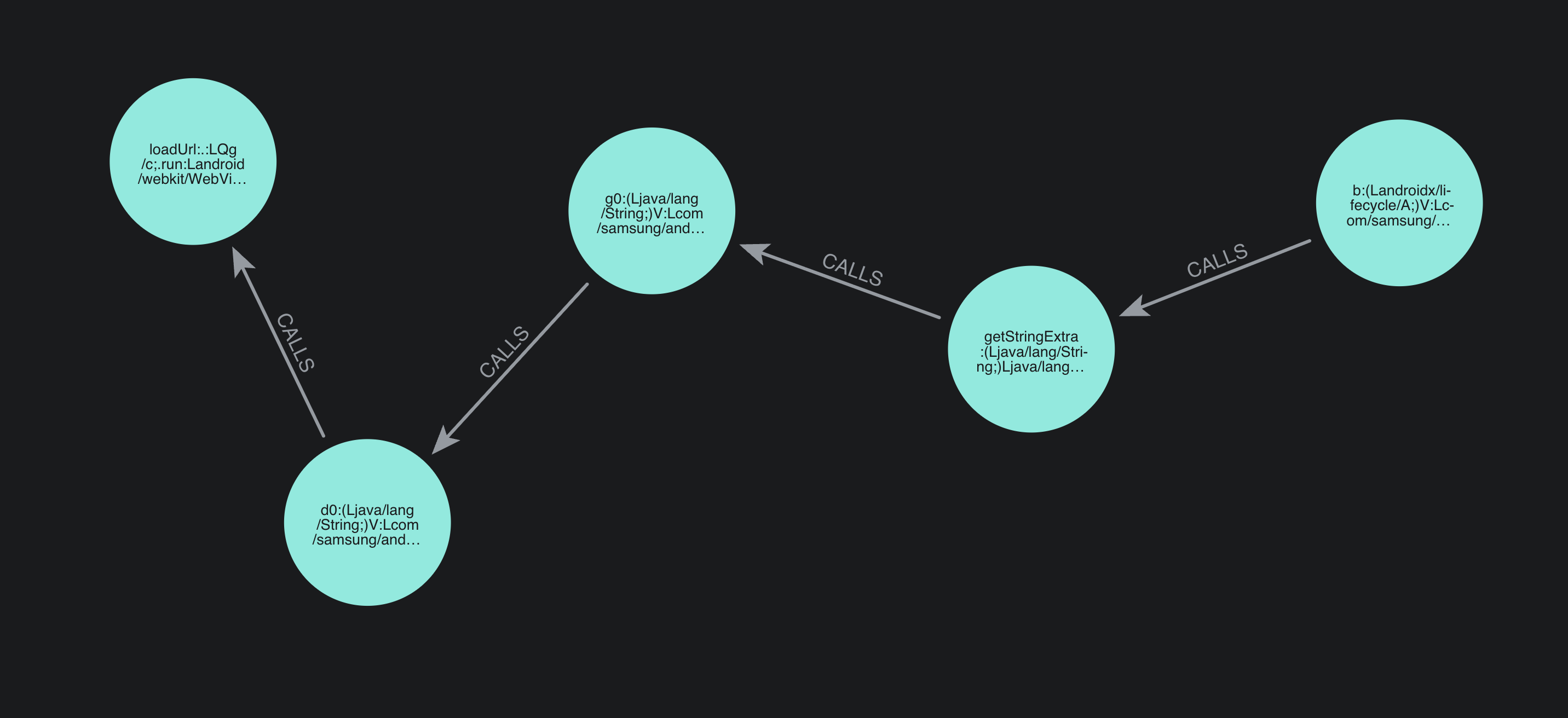
Since it's a static analysis tool, it produces a lot of false positives, and it cannot catch more advanced patterns (for example if data is stored in a DB, or is passed through an asynchronous Handler), but it still helps spotting interesting apps to focus on.
A first vulnerability
While looking at WebViews loading URLs from a browsable intent, we saw that deeplinks of the form samsungapps://MCSLaunch?action=each_event&url=<url> could load the given <url> inside a WebView in the Galaxy Store application. A few domain names are whitelisted, including gmp.samsungapps.com.
After a quick search, our colleague Edgar uncovered a bunch of webpages hosted under this domain of the form:
https://gmp.samsungapps.com/promotion/20230828064915/index.html?t=prm&product=galaxystoreHe found out that the webpage hosted there is vulnerable to Javascript injection. The HTTP server hosting the HTML files appears to do some dynamic rewriting of its contents, substituting the query URL into the SHARE_PAGE_URL variable in the inline Javascript of the returned page contents:
<!DOCTYPE html>
<html xmlns="http://www.w3.org/1999/xhtml">
    <head>
        <script>
            var APP_PACKAGE = "com.sec.android.app.samsungapps";
            var CUSTOM_SCHEME = "samsungapps://GMPLaunch?action=each_event&url=https%3A%2F%2Fgmp.samsungapps.com%2Fresources%2F20230828064915%2FActivated%2Fhtml%2FMain%2Findex.html%3Ft%3Dprm";
            var SHARE_PAGE_URL = "https://gmp.samsungapps.com/resources/20230828064915/Activated/html/Main/index.html?t=prm";

<!-- ... -->
As the rewriting does not take into account special characters, we can craft an URL as follows:
https://gmp.samsungapps.com/promotion/20230828064915/index.html?t=prm&product=galaxystore&jumpTo=";prompt(1);//The HTML returned will now be:
<!DOCTYPE html>
<html xmlns="http://www.w3.org/1999/xhtml">
    <head>
        <script>
            var APP_PACKAGE = "com.sec.android.app.samsungapps";
            var CUSTOM_SCHEME = "samsungapps://GMPLaunch?action=each_event&url=https%3A%2F%2Fgmp.samsungapps.com%2Fresources%2F20230828064915%2FActivated%2Fhtml%2FMain%2Findex.html%3Ft%3Dprm";
            var SHARE_PAGE_URL = "https://gmp.samsungapps.com/resources/20230828064915/Activated/html/Main/index.html?t=prm";prompt(1);//;

<!-- skipped for brevity -->
This means we can run our own JavaScript code in the WebView context:
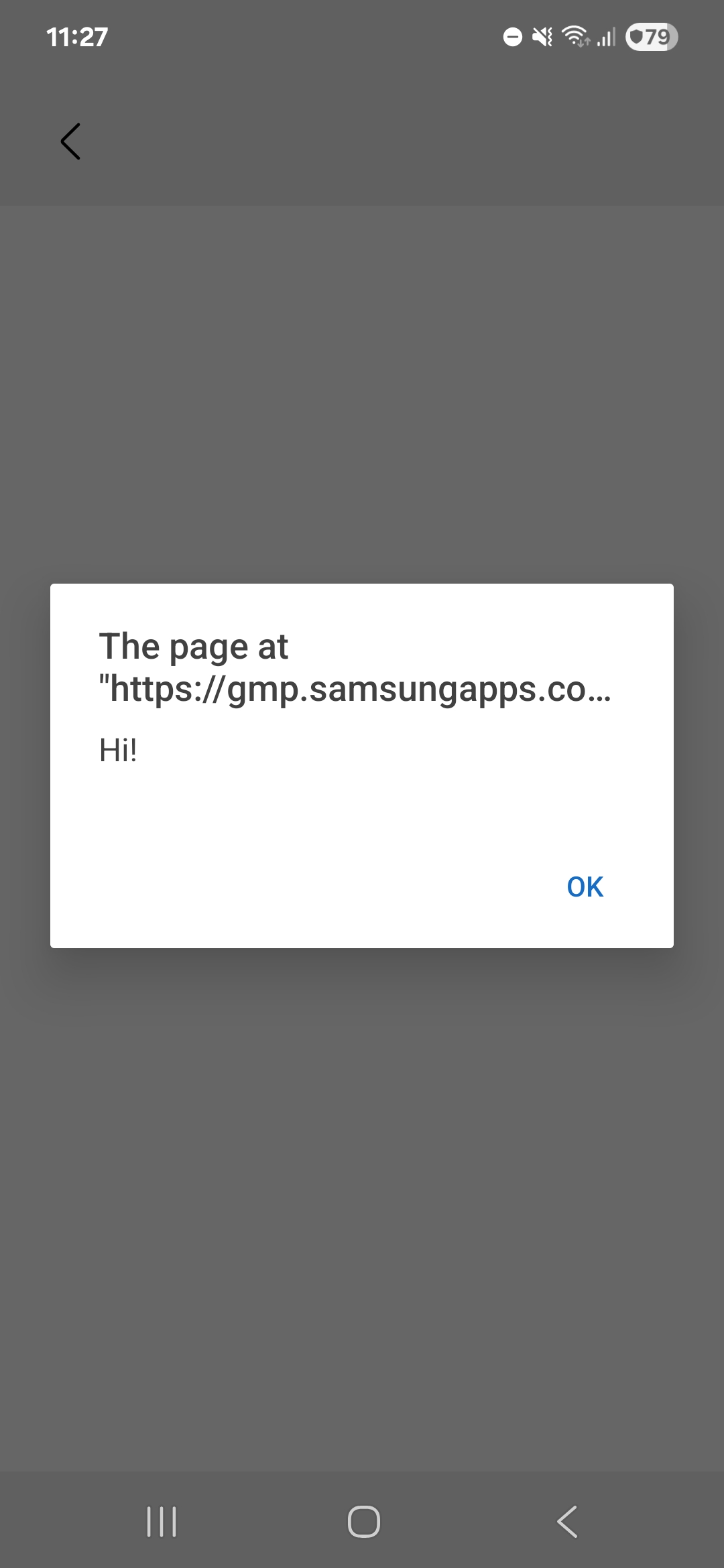
Also, a couple of Javascript interfaces are registered on this WebView, meaning we can call the exposed Java methods:
@JavascriptInterface
public void downloadApp(String str) {
    g0 g0Var = new g0(this, str, 3);
    WebView webView = this.b;
    if (webView != null) {
        webView.post(g0Var);
    }
}

// <...other methods...>
However, even if this method looked quite promising at first, it doesn't allow downloading arbitrary apps. In fact, most of the methods simply redirect to another activity and require user interaction before anything interesting happens. As similar attack vectors have been used in the past in this app (see for example this writeup, where adding a directInstall query parameter to the intent would directly start downloading an app in the Galaxy Store), we didn't find vulnerable JavaScript bindings.
Still, this injection can be useful. The Galaxy Store is allowed to launch activities from the background:
<uses-permission android:name="android.permission.START_ACTIVITIES_FROM_BACKGROUND"/>In a scenario where we'd have to chain multiple bugs together, this could be used to launch deep links from the background. We will come back to this primitive a bit later in the write-up.
Identifying a good target
After reviewing Galaxy Store and several other Samsung apps, we came across Samsung Smart Switch, an app to migrate data when switching to a new phone. It transfers contacts, music, movies, etc, and more importantly applications from the old device to the new one. Therefore, the app is very privileged:
<uses-permission android:name="android.permission.INSTALL_PACKAGES"/>
<uses-permission android:name="android.permission.REQUEST_INSTALL_PACKAGES"/>
<uses-permission android:name="android.permission.MANAGE_EXTERNAL_STORAGE"/>
<!--plenty of other system level permissions-->
The app had also been shown to be vulnerable in the past: one of its components (the Smart Switch Agent) was part of the NCC Group exploit chain used to pwn the Samsung S24 during Pwn2Own 2024. Some sanity checks were missing, and with the right setup it allowed arbitrary APKs installation. This was enough to decide that the app was worth reviewing.
Samsung Smart Switch
When launching the app, it can be configured to either send data (from the old phone) or receive data (on the new phone).
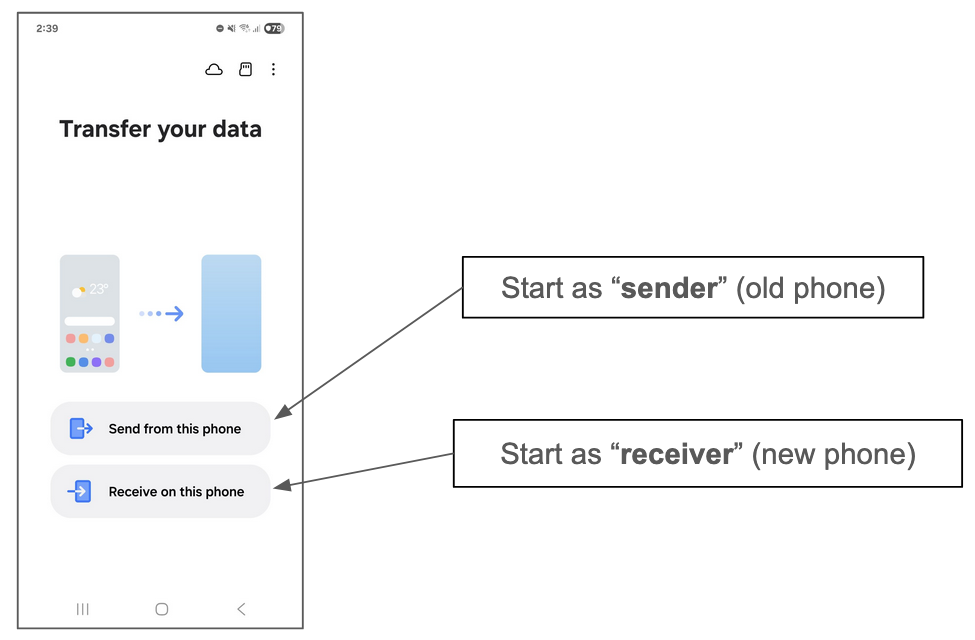
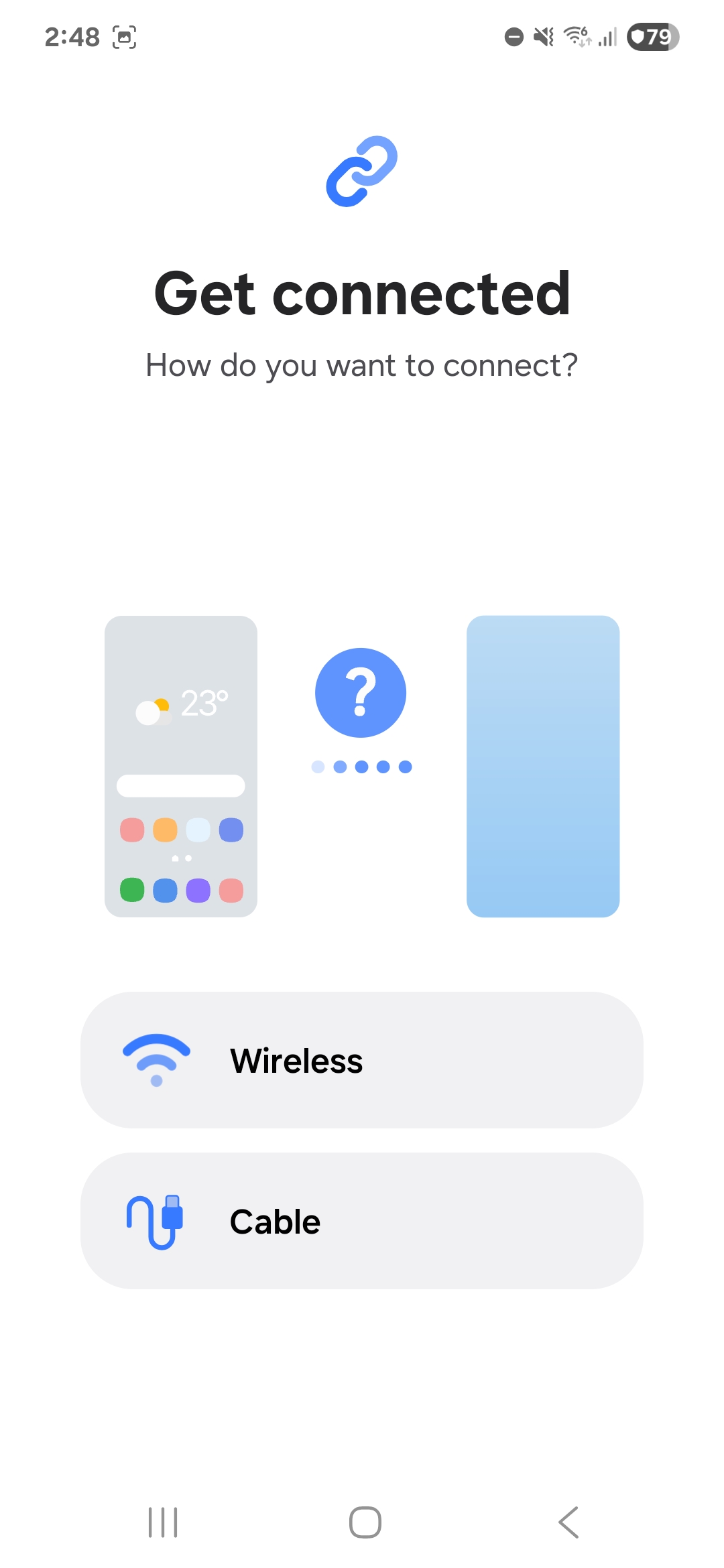
In the blog post, we use the terms "sender" and "receiver" to refer to each side. The transfer can happen either through cable or wireless:
To connect the two phones, the receiver displays a QR code containing connection metadata, and the sender scans it:
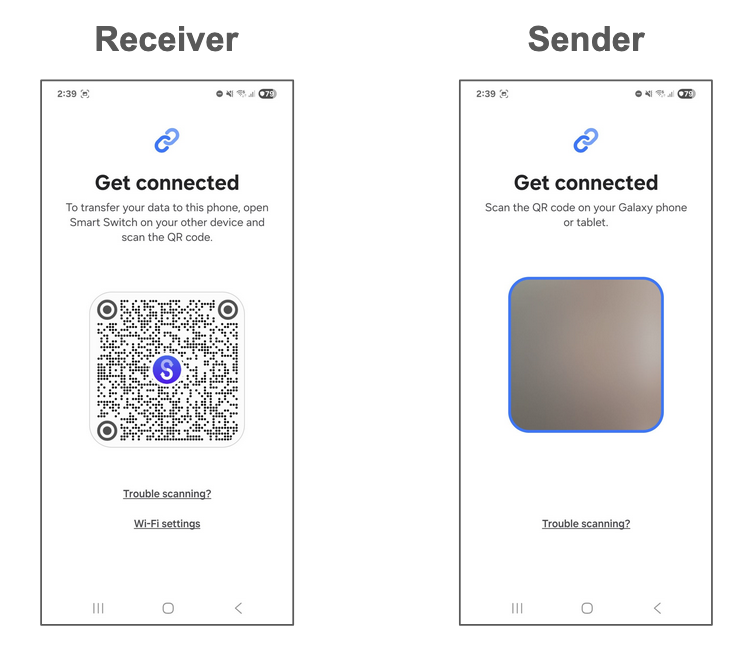
Once the QR code is scanned, the transfer process begins. The sender's phone is inspected, and the receiver is presented with a screen listing everything that can be migrated:
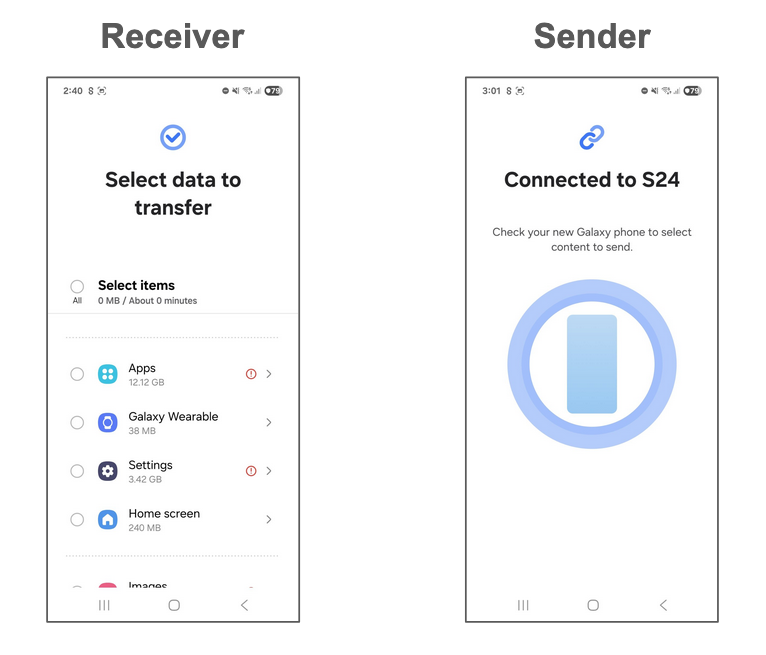
The transfer then takes place, data is migrated and applications are automatically installed. The permissions they depend on are also copied from the previous phone. Note that after the QR code scanning step, only the receiver has to interact with the app (to choose the content to transfer). The sender no longer needs to interact with the app.
Entry points
Looking at the application's manifest, we found an activity that could be reached from the browser using a deep link of the form smartswitch://launch:
<activity
    android:name="com.sec.android.easyMover.ui.launch.DeepLinkActivity"
    android:theme="@style/SmartSwitchTheme.BlankActivity"
    android:exported="true"
    android:launchMode="singleTask">

    <intent-filter>
        <action android:name="android.intent.action.VIEW" />

        <category android:name="android.intent.category.DEFAULT" />
        <category android:name="android.intent.category.BROWSABLE" />

        <data
            android:scheme="smartswitch"
            android:host="launch" />
    </intent-filter>

    <!-- [...] -->

</activity>
The DeepLinkActivity handles this deep link and parses a few query parameters:
String queryParameter = data.getQueryParameter("deeplink");

if ("settings".equals(queryParameter)) {
    intent2 = new Intent(this, SettingsActivity.class);
} else if ("d2d_conn".equals(queryParameter)) {
    intent2 = new Intent(this, MainActivity.class)
        .putExtra("target_intent",
            new Intent(this, WirelessConnectingActivity.class).setData(data)
        );
    setTargetSenderType(intent2, data);
}
// [...] other keys
We can see that by passing the query parameter deeplink=d2d_conn, the handler jumps to an interesting WirelessConnectingActivity. This activity is actually the pairing activity shown when the phones start pairing after the QR Code has been scanned:
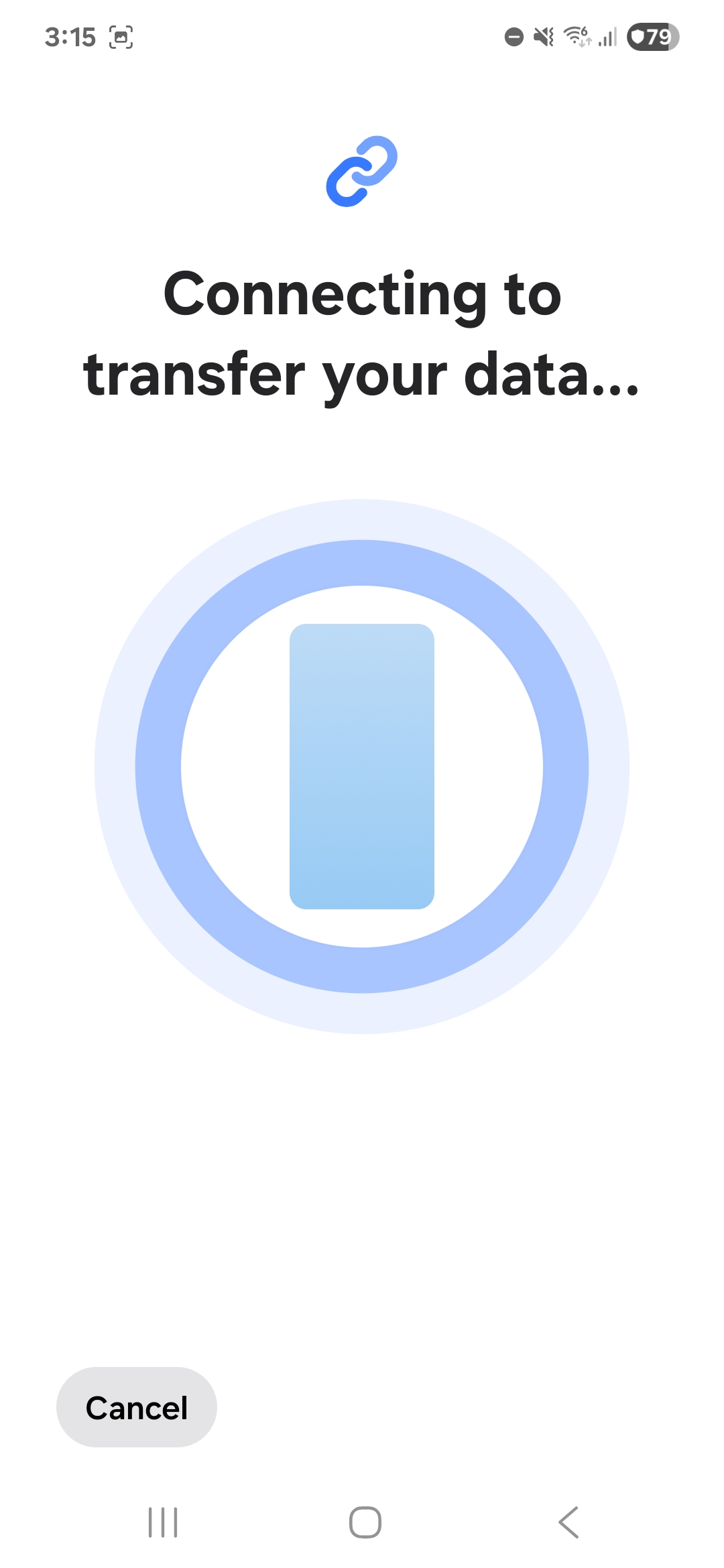
This is pretty powerful, since it skips the entire scanning step and jumps straight to the connection flow without any further user interaction! It also turns out that the intent handler parses a sender_type parameter that controls whether the app should start in sender mode (sender_type=s) or receiver mode (sender_type=r).
At that point, we started wondering what this could let us do. If we can connect to a sender, can we pull sensitive data from it? If we can connect to a receiver, can we push data to it, such as an app? To answer that, we first needed to understand how the phones actually connect during a transfer. The logs generated when triggering the deep link in receiver mode suggested that Wi-Fi Direct was being used:
[SSM]WifiDirectManager: onGroupInfoAvailable - DIRECT-3Q-Samsung S24, frequency : 5745This was confirmed by scanning the available Wi-Fi Direct networks with another phone.
Wi-Fi Direct Primer
In Wi-Fi, one device creates a peer-to-peer network, called a group. One device (it doesn't have to be the same one) manages the group (it's the group owner). The other devices connect as clients.
In Smart Switch, the receiver takes care of creating the network. It embeds its MAC address in the QR Code shown to the sender, and the sender uses it to join the correct Wi-Fi Direct network. A negotiation takes place to define which side becomes the group owner. The group owner takes care of distributing the IP addresses (acting as the DHCP server), and the client is assigned an IP address. We won't go into the details here, as they are not important for understanding the rest of the write-up.
Eventually, each side creates a TCP socket, listening on port 9400. Interestingly, this means that communication happens over two unidirectional TCP connections instead of a single bidirectional one. We are not quite sure whether this was a deliberate design choice or a simplification to have symmetric logic on both sides.
The network that the receiver created is open, so anyone can connect to it. This means we can use our receiver-mode deep link (smartswitch://launch?deeplink=d2d_conn&sender_type=r), and connect to it from a laptop. The overall set up looks like this:
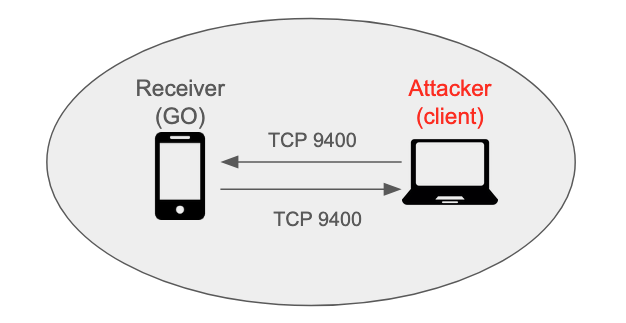
We could now freely send data to the receiver's socket. But what could we actually send there?
Protocol Analysis
To analyse how the app communicates, we chose to use jadx-gui. Despite the use of Proguard in the app, which obfuscated most symbols, we were still able to get a pretty good view of program logic and data structures (unlike C programs). This section will skip quite a fair bit of call tracing. Otherwise, the blog post will become insanely long.
When data is received on TCP port 9400, g6.h.h is invoked to handle it.
g6.g0.d(Native Method)
g6.h.l(SourceFile:129)
g6.h.h(SourceFile:933)
com.sec.android.easyMover.wireless.netty.NettyChannelHandler.channelRead(SourceFile:27)
io.netty.channel.AbstractChannelHandlerContext.invokeChannelRead(SourceFile:12)
<...omitted...>
For our case of Android-to-Android transfers, f0.a.L is invoked to parse the incoming data:
public static E L(byte[] receivedStream) {
        // <...omitted...>
        E e = new E();
        e.g = 1;
        e.f = receivedStream;
        e.h = m.c(0, receivedStream, true);
        e.i = m.d(receivedStream, 4);
        e.j = m.d(receivedStream, 12);
        String strK = m.k(m.c(20, receivedStream, true));
        // <...omitted...>
        e.k = strK;
        D d = (D) ((S6.b) D.getEntries()).get(receivedStream[24]);
        j.f(d, "<set-?>");
        e.l = d;
        e.m = receivedStream[27] == 1;
        e.n = receivedStream[31] == 1;

/* m.c and m.d in com.sec.android.easyMoverCommon.utility: */

public static int c(int i, byte[] bArr, boolean z) {
        return ByteBuffer.wrap(bArr, i, 4).order(z ? ByteOrder.BIG_ENDIAN : ByteOrder.LITTLE_ENDIAN).getInt();
    }

public static long d(byte[] bArr, int i) {
    return ByteBuffer.wrap(bArr, i, 8).order(ByteOrder.BIG_ENDIAN).getLong();
}
As seen above, the parser looks for a 32-bit integer at offset 0, two 64-bit integers from offset 4, four bytes from offset 20, and the three bytes at offset 24, 27 and 31, all big-endian. Together, these fields make up the header of every command sent to TCP port 9400. From our reverse engineering, the purposes of the fields are as follows. Additionally, as Netty’s length field framing is in use to demarcate boundaries, every command is prepended with a big-endian 32-bit length:
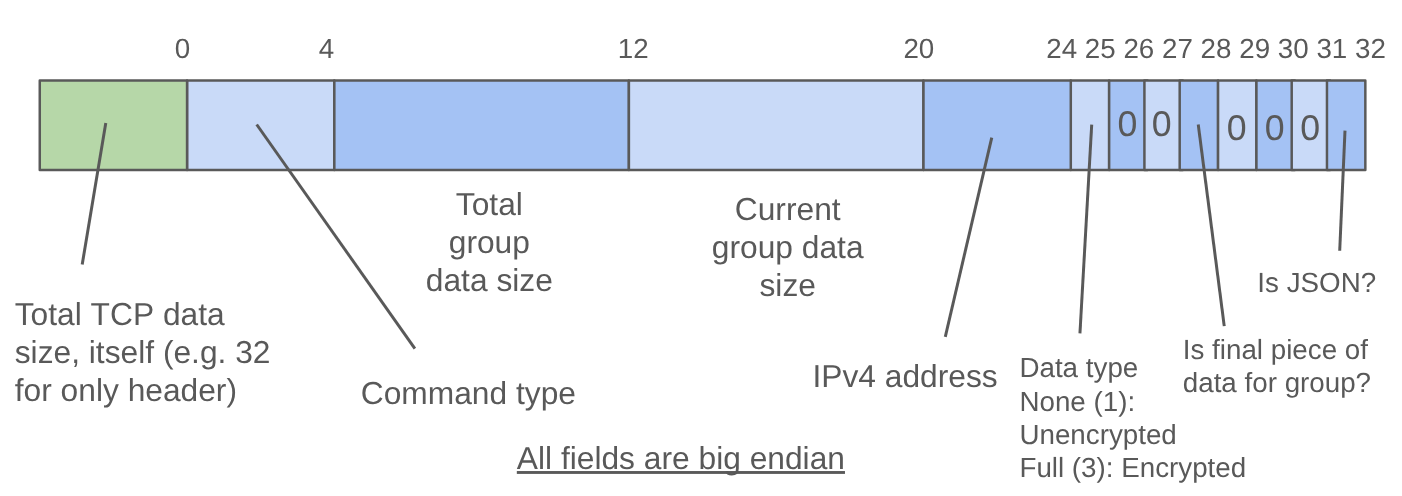
When the byte at offset 24 is set to 3, the data that follows the header is encrypted using Java's "AES/CBC/PKCS5Padding" algorithm. The first 16 bytes of the ciphertext is the IV, while the key is either a 32-byte random value generated in the receiver, or the SHA256 hash of the last 3 bytes of the same 32-byte random value. More on that later.
So, what can commands do then? Conveniently, the class g6.k (a.k.a Command) populates a sparse array that maps command numbers to their human-readable names:
public abstract class k extends m6.l {
    public static final String h = androidx.appcompat.widget.a.j(Constants.PREFIX, "Command");
    public static final SparseArrayCompat i;
    public static final SparseArrayCompat j;

    static {
        SparseArrayCompat sparseArrayCompat = new SparseArrayCompat(1024);
        i = sparseArrayCompat;
        SparseArrayCompat sparseArrayCompat2 = new SparseArrayCompat(1024);
        j = sparseArrayCompat2;
        sparseArrayCompat.put(1, "CMD_DEVICE_INFO");
        sparseArrayCompat.put(34, "CMD_UPDATE_DEVICE_INFO");
        sparseArrayCompat.put(7, "CMD_TOTAL_CONTENTS_INFO");
        sparseArrayCompat.put(8, "CMD_SENDMSG_RESULT");
        sparseArrayCompat.put(5, "CMD_CATEGORY_CONTENTS_INFO");
        sparseArrayCompat.put(3, "CMD_FILE_SEND_INFO");
        sparseArrayCompat.put(4, "RSP_FILE_SEND_INFO");
        sparseArrayCompat.put(2, "CMD_FILE_DATA_SEND");

// <...omitted...>
In the following subsections, we will analyse three interesting commands that caught our eyes.
Command 2: CMD_FILE_DATA_SEND
The exact details of how to use this command are a bit complicated, so we’ll leave interested readers to consult our exploit script. Essentially, we first send a CMD_FILE_DATA_SEND command with the JSON data of:
{
  "Path": <your path here>,
  "Type": "Unknown",
  "DeviceType": "Unknown"
}
We then follow up with file data, split into chunks of up to ~15000 bytes. The end result is that our data will be written to any file of our choosing, without notifying the receiver. Additionally, if the file's parent directory does not exist, it will be created. While these seem a little surprising security-wise, they can be somewhat explained by the fact that this command is also used to transmit large chunks of metadata; it wouldn’t be feasible to seek user permission for each one.
From the perspective of an attacker, this command has a key issue: it does not overwrite files. Instead, the app will write to a new file with (N) appended to its name (e.g. filename(1).txt). This can be seen in com.sec.android.easyMoverCommon.utility.i0, invoked by com.sec.android.easyMoverCommon.utility.G0. It is nonetheless easy to bypass this restriction. Overwriting is permitted if the file path contains the substring "SYNC_DATA_TEST", and there is no path traversal checks. We simply have to write to /path/SYNC_DATA_TEST/a to create the SYNC_DATA_TEST directory, then write to /path/SYNC_DATA_TEST/../file, in order to overwrite /path/file.
Having said this, there is, in fact, little we can do with this file-write primitive due to tight filesystem permissions on modern Android systems. There is nothing interesting we can overwrite in the app’s folder at /data/data/com.sec.android.easyMover, and writing to shared locations such as the SD card didn’t yield results either.
Command 53: CMD_CERT_VERIFICATION
This command accepts a serialized certificate chain as data, in f2.g.f. The code to do this is as such:
public final boolean f(byte[] bArr) throws Throwable {
        ArrayList arrayList;
        ByteArrayInputStream byteArrayInputStream;
        /* ...omitted... */
        try {
            byteArrayInputStream = new ByteArrayInputStream(bArr);
        } catch (Exception e2) {
            /* ...omitted... */
        }
        try {
            ObjectInputStream objectInputStream = new ObjectInputStream(byteArrayInputStream);
            try {
                arrayList = (ArrayList) objectInputStream.readObject();
This is a classic code pattern for a Java deserialisation bug, commonly exploited using the ysoserial for Java applications such as Apache Struts. However, it seems that this kind of bug is very unlikely to be exploitable in Android apps, and we didn't find anything in the Smart Switch app, so we didn't do anything with it.
Command 288: CMD_ENTER_FUS_MODE
This command is less of a primitive and more of an interesting oddity. FUS mode stands for Firmware Update Service mode, and it is more commonly known in the rooting community as Download mode. In this mode, a user can flash firmware onto the phone over USB.
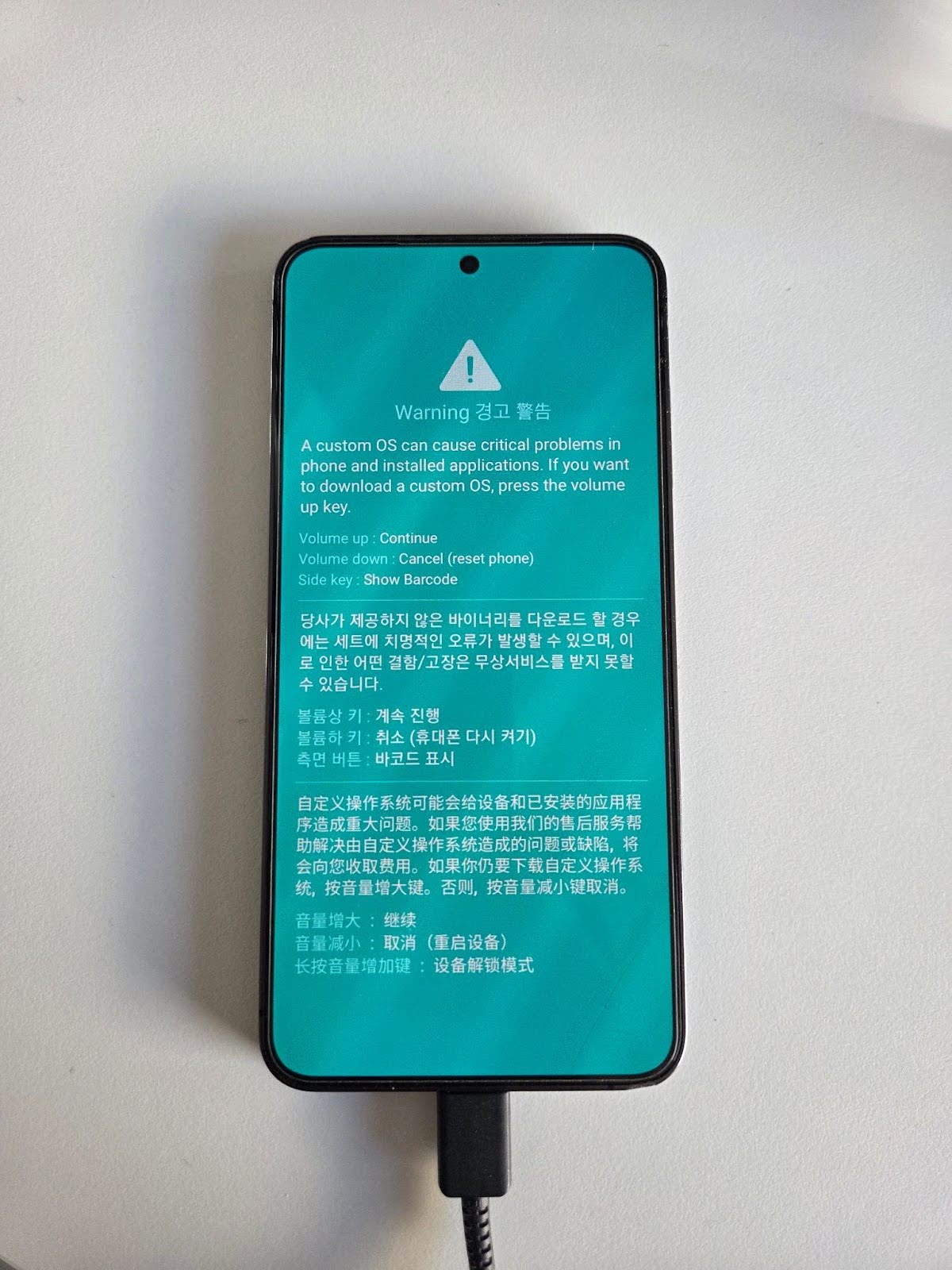
It normally requires a specific sequence of actions from the user (i.e. powering off the phone, then pressing and holding buttons), so we were surprised when sending command 288 rebooted the phone into download mode without any user interaction. Anyway, there wasn’t much more we could do with this, as there isn’t a way to flash the phone over the air as far as we can tell.
Fun with LAN
Lan transfer
Up to the current point, we have been working with the Smart Switch app over Wi-Fi Direct:
- We spawn the app in receiver mode using a deep link on the S25
- We connect to the S25 using Wi-Fi Direct
- Send commands over TCP port 9400 to the app to do something interesting.
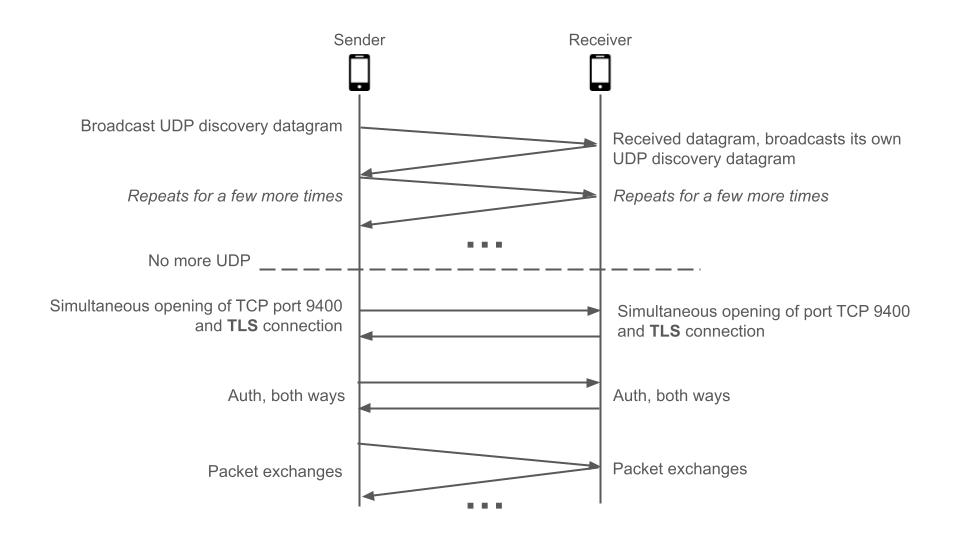
It would be more interesting if we could find a vector that doesn't require physical proximity to the target, like Wi-Fi Direct, and also actually watch the protocol in action rather than reverse engineer individual commands. Fortunately, the app actually supports another form of wireless transfer, over the local area network (LAN).
On the sender end, at the bottom of g6.J0.handleMessage, the app does a check of the SDK and One UI version using com.sec.android.easyMoverCommon.utility.d0.K. It checks for a successful Wi-Fi Direct connection with the receiver either 5 times at 10,000 ms intervals (50s), or in our case, 9 times at 5,000 ms intervals (45s). If no connection has been made by then, it prompts the user to connect via LAN as such:
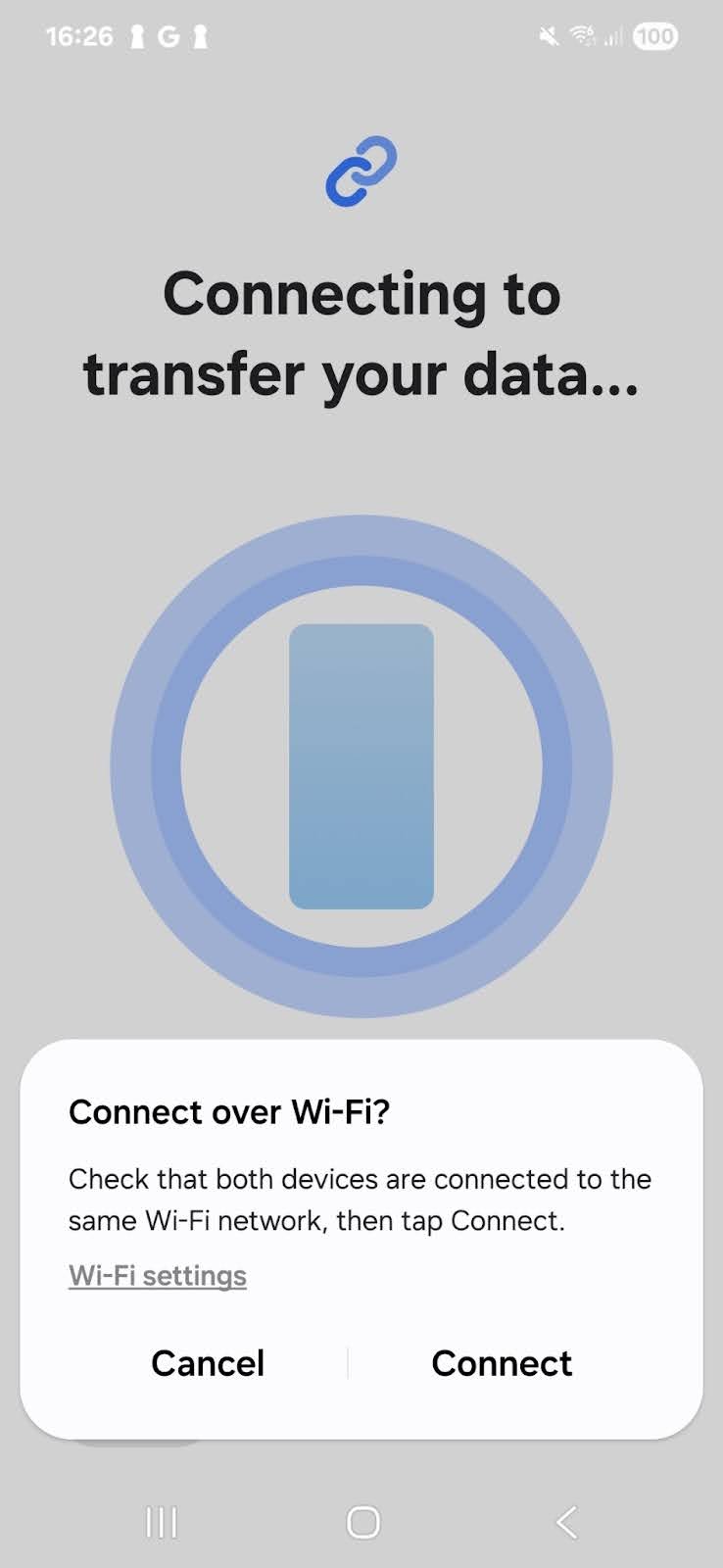
Clicking the "Connect" button causes the app to broadcast command 45 (CMD_BRIDGE_CONN_INFO) towards UDP port 8400 on the IPv4 broadcast address (e.g. 192.168.0.255). The content in the UDP datagrams is encrypted, but we can easily decrypt it. Recall that the receiver generates a 32-byte random key for encrypting data using AES. This key is, in fact, embedded within the QR code and passed to the sender when it is scanned.
smartswitch://launch?deeplink=d2d_conn&sender_type=r&conn_param=AAE9S_qkHpQuF3AzKku6Qk_ECKp6dm-_qKrN-n2gjt2DrebK8Y4WdASyGiven the URL above, encoded in a sample QR code from the receiver, we simply need to do URL-safe base64 decoding of conn_param and retrieve bytes 6-38 to get the key. However, only the last 3 bytes are used, and we will need to obtain the SHA256 hash of the 3 bytes to produce the actual key used in AES. The reason for this design is to maintain consistency with the other mode, PIN mode.
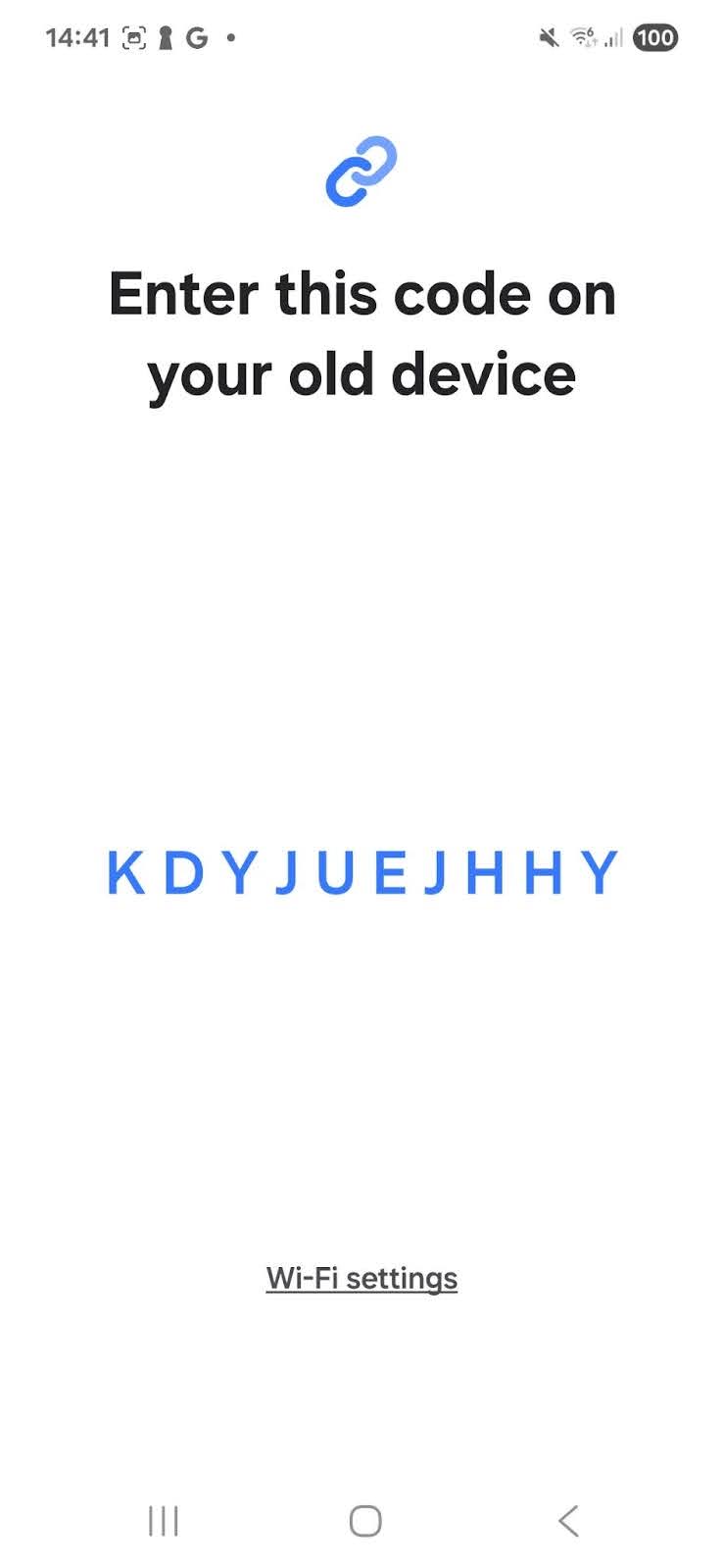
When QR scanning is unavailable or does not work for any reason, the receiver can produce a 10-character PIN instead. As one can probably guess, this is far too little information to encode a 32-byte key. Instead, the first 8 characters are encoded using base32 while the last 2 work as a checksum. The last 3 bytes contained in the encoded 8 characters are ones from the random 32 bytes in the receiver. So, for example, the PIN IFA4V4MOVQ is functionality equivalent to the previous deep link, at least during the UDP broadcast stage:
>>> base64.b32decode('IFA4V4MO')[-3:]
b'\xca\xf1\x8e'
>>> base64.urlsafe_b64decode('AAE9S_qkHpQuF3AzKku6Qk_ECKp6dm-_qKrN-n2gjt2DrebK8Y4WdASy')[6:38][-3:]
b'\xca\xf1\x8e'
Back to the broadcasted command 45 datagrams, decrypting them produces the following JSON, which provides all the necessary information to the receiver (we are not quite sure what tcpLevel does):
{
	"Ip":"192.168.0.102",
	"tcpLevel":4,
	"receiverDeviceName":"Galaxy S25",
	"osVer":35
}
Upon receiving a single command 45, the receiver begins broadcasting the same command containing its own information. After a few iterations, both the receiver and sender will connect to each other on TCP port 9400, just as in Wi-Fi Direct. Perhaps to thwart sniffing attacks over LAN, they now also employ TLS with a custom signed certificate. It isn't possible to do any form of certificate verification anyway, since the connections are peer-to-peer.
In order to have some way to intercept the command packets exchanged during a normal transfer (and also because Yichen didn't have a second S25 working remotely), we came up with a setup where the sender app will run within an Android emulator. Python scripts will forward data between the emulator and the real S25 running the receiver app. The setup loosely resembles a router providing Network Address Translation (NAT):
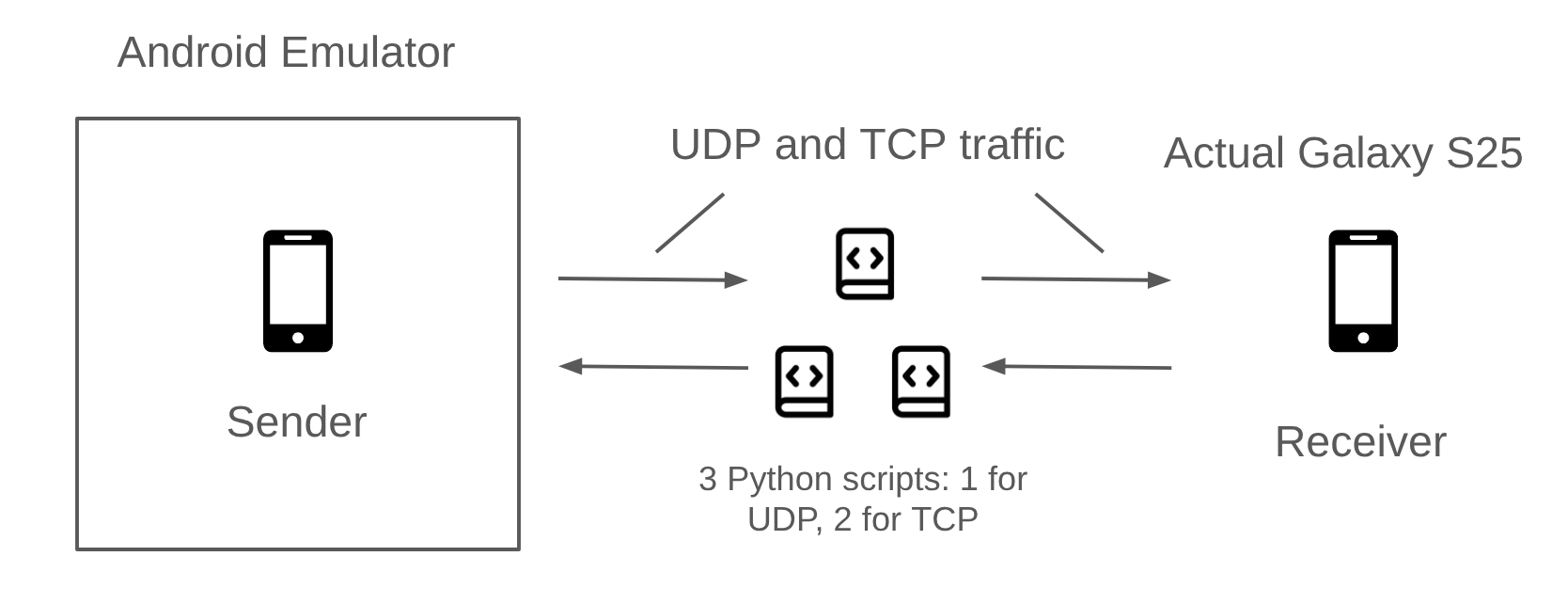
You can also have a look at the forwarder script here.
Identifying flaws
With the forwarder in place, our next steps were to experiment with replay attacks. We already know that the app will blindly accept commands from the previous section, so we suspected that replaying the command traffic for a legitimate transfer might cause the receiver to start installing APKs. The experimental setup was a simple three-step process:
- Obtain the receiver's PIN and use it to start a transfer session with the forwarder in between
- Inject commands previously captured from another transfer in the TCP connection from sender to receiver
- Profit ???
This approach has the benefit of side-stepping the initial authentication phases in the protocol for the sake of experimentation and allows us to focus solely on the commands used for data transfer. Unfortunately, even so, we did not manage to get it working before the Pwn2Own registration deadline. But what prevented our replay from working? What immediately comes to mind is that perhaps the receiver maintains some state and has checks in place to prevent an attacker from starting a restore before the user has made their selection. Hint: it wasn't that.
The following backtrace shows the execution flow from receiving a command to the start of the restoration process.
com.sec.android.easyMover.host.MainFlowManager.startRestoring
com.sec.android.easyMover.host.MainFlowManager.sentAll
g6.x.C
g6.x.L
g6.x.g
g6.x.handleMessage
g6.x.handleMessage is the dispatcher for most commands received on TCP port 9400, and sentAll is more or less a wrapper around startRestoring. The key is in g6.x.C:
public final void C() {
        Thread thread;
        Iterator it;
        Iterator it2;
        String path;
        int i = 3;
        ManagerHost managerHost = this.a;
        if (managerHost.getData().getJobItems().v()) {
            if (!managerHost.getData().isPcConnection()) {
            	// l6.a.b is just logging
                l6.a.b(3, n, V1.e.h("isFastTrackApplyStep - ", com.sec.android.easyMoverCommon.utility.y.b()));
                if (com.sec.android.easyMoverCommon.utility.y.b()) {
                    thread = null;
                    new ContentsApplyController().g(null);
                } else {
                    thread = null;
                    MainFlowManager.getInstance().sentAll();
                }
        // <...omitted...>
com.sec.android.easyMoverCommon.utility.y.b normally returns false for us, so really our focus is on how to get managerHost.getData().getJobItems().v() to return true. v's decompilation is as such:
public final boolean v() {
    Iterator it = this.a.iterator();
    while (it.hasNext()) {
        if (((s) it.next()).m.ordinal() < q.RECEIVED.ordinal()) {
            return false;
        }
    }
    return true;
}

// ...separate class, enum q...
public enum q {
    UNKNOWN,
    WAITING,
    PREPARE,
    PREPARED,
    SENDING,
    RECEIVING,
    RECEIVED,
    UPDATING,
    COMPLETED,
    CANCELED,
    NODATA,
    UPDATE_FAIL
}
We now have a rough idea: for a list of "job items" (instances of s6.s) the receiver maintains, all of them have to be in some "ready" state (e.g. received, cancelled etc.) before restoration can take place. The good news is that this very much doesn't look like a security check. So, what are job items, and why are they not ready in our replay experiment?
To figure this out, we have to first look at command 21 (CMD_CONTENT_LIST_INFO). This command, sent from the sender to the receiver, contains JSON and advertises the complete list of data contained in the sender's phone. This data is what the receiver uses to display the selection screen.
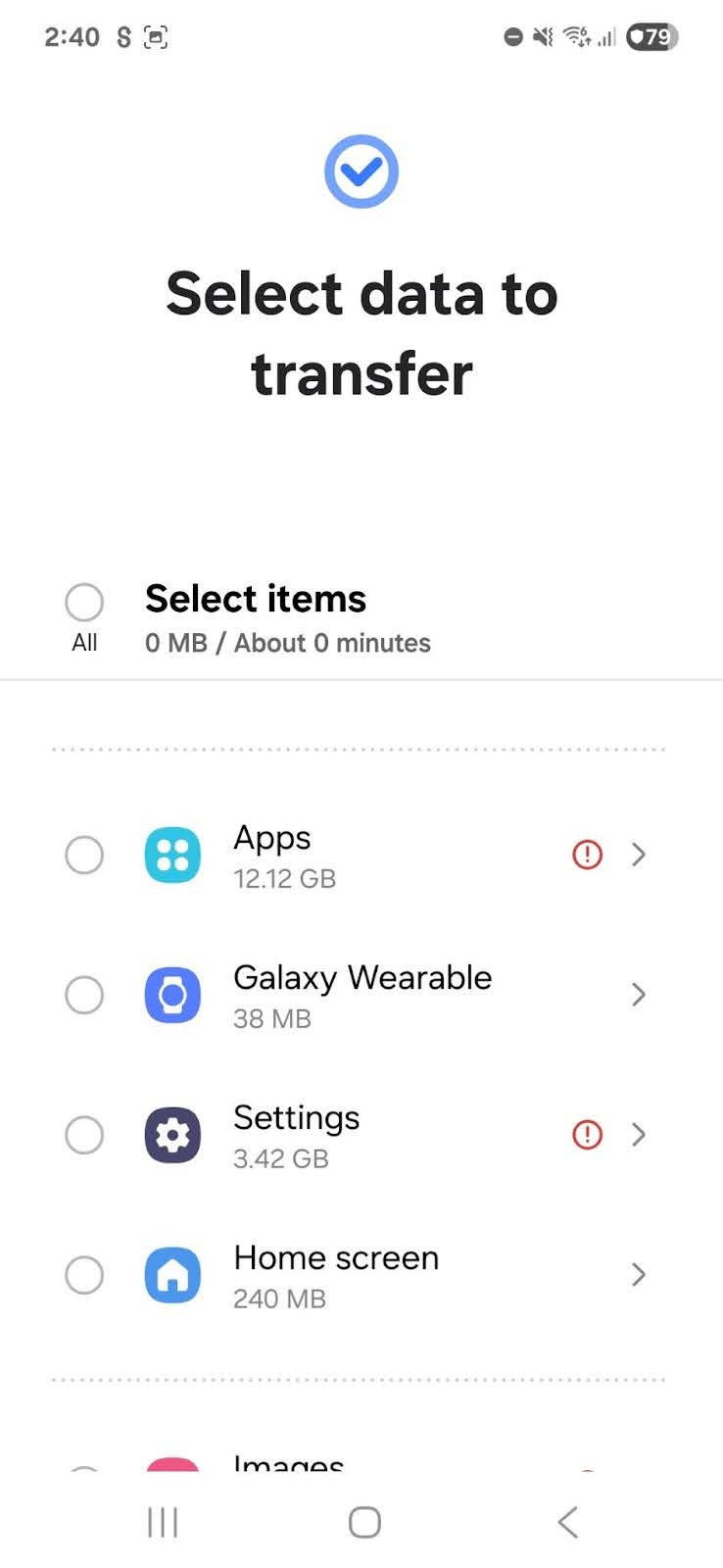
The processing of this command can be traced as follows:
java.util.concurrent.CopyOnWriteArrayList.add(Native Method)
s6.y.a(SourceFile:124)
com.sec.android.easyMover.data.common.r.g(SourceFile:97)
Z1.q.run(SourceFile:1181)

Z1.q.<init>(Native Method)
com.sec.android.easyMover.data.common.r.m(SourceFile:33)
I2.d.e(SourceFile:39)
com.sec.android.easyMoverCommon.utility.P.c(SourceFile:28)
g6.x.handleMessage(SourceFile:2341)
As before, g6.x.handleMessage is the entry point for packets to be dispatched to their handler. At Z1.q, we have a break in the execution flow as the run method is running in another thread. In com.sec.android.easyMover.data.common.r.g, we see this:
public final void g(long j, JSONObject jSONObject) {
        this.j = new s6.y();
        MainDataModel mainDataModel = this.b;
        /* ...omitted... */
        D5.s sVarI = jSONObject != null ? D5.s.i(null, com.sec.android.easyMoverCommon.type.y.Restore, jSONObject, this.j, s6.r.WithBrokenList, this.f) : null;
        /* ...omitted... */
        Iterator it = DesugarCollections.unmodifiableList(this.j.a).iterator();
        while (it.hasNext()) {
            mainDataModel.getJobItems().a((s6.s) it.next());
        }
The method D5.s.i, among other things, stores instances of s6.s in the field of this.j.a based on the array for the key "IsApp" in the JSON contained in a command 21 packet. In the following lines, the s6.s instances are then stored in the field mainDataModel.getJobItems().a using the s6.y.a method. These s6.s instances, our job items, will then be checked by method v shown previously.
Here's a snippet of what is under "IsApp" in the JSON:
"IsApp": [
        "CONTACT",
        "GMMESSAGE",
        "MESSAGE",
        "CALENDER",
// Followed by 151 entries
From their names, we can guess that the entries describe the kind of data the sender supports, such as messages, contacts, apps and more. On the receiver, we observed experimentally that 36 of these "data types" end up getting stored as job items. When we select the data we want to transfer on the receiver's screen and press "Transfer" button, we hit this code path:
com.sec.android.easyMover.host.MainDataModel.makeJobItems(SourceFile:355)
com.sec.android.easyMover.ui.PreTransportActivity.B(SourceFile:7)
com.sec.android.easyMover.ui.PreTransportActivity.E(SourceFile:379)
com.sec.android.easyMover.ui.PreTransportActivity.onCreate(SourceFile:120)
To keep it brief, makeJobItems replaces mainDataModel.getJobItems().a with a new empty list (s6.y.b) and populates it with job items for only the data selected by the user. From our experimentation with transferring a single app, the list is populated with 4 job items.
The big vulnerability
To sum it up, the receiver:
- Generates a list of job items based on the list of supported data types from the sender
- Overwrites the list with a list of job items based on the user's selection
- At transfer time, check if all job items on the list are ready (e.g. received data/failed/whatever). If so, start restore (and install APKs)
There's nothing stopping us from skipping step 2, which requires user interaction! Previously, our replay attack did not work because we only sent data for 4 job items. Without step 2, the receiver expects data for all 36 in the original list. By injecting packets with command 33 (CMD_UPDATE_OBJ_ITEM), we can manually update the status of the remaining 32 job items to NODATA (see enum q above). Voilà, the receiver starts the restoration process! We could probably also instead shrink the list advertised in "IsApp" to only 4 job items, but we did not try this, as the current approach works well enough.
This is a major design flaw and demonstrates that the developers made the app blindly trust the other end for almost everything. The receiver end of the app should not be able to initiate restoration without explicit permission from the user, in our opinion.
However, more work needs to be done to weaponise this vulnerability as a 1-click. At the start of this section, we mentioned that our experimental setup requires obtaining the receiver's PIN for a successful authentication before dealing with the actual transfer. We will need some way to break authentication.
Breaking Authentication
In Smart Switch, a transfer begins with a simple authentication phase. It starts at the very beginning, when the receiver generates the QR Code. Along with its MAC address, it also embeds a cryptographic key. We call this key auth_key. For example, decoding the QR Code we showed earlier gives the following deeplink:
smartswitch://launch?deeplink=d2d_conn
    &sender_type=s
    &conn_param=AAGdfewmu5zynslYiBf7NYe8neakkNDyn8iiSZlZlutoz7LmMAgWdZry
The conn_param parameter is a base64-encoded serialized structure containing the MAC address, the cryptographic key and the version of the app used by the receiver. During authentication, each side verifies that the other side knows this key. If the authentication succeeds, the key is then used to encrypt the rest of the exchange. The authentication phase roughly unfolds as follows:
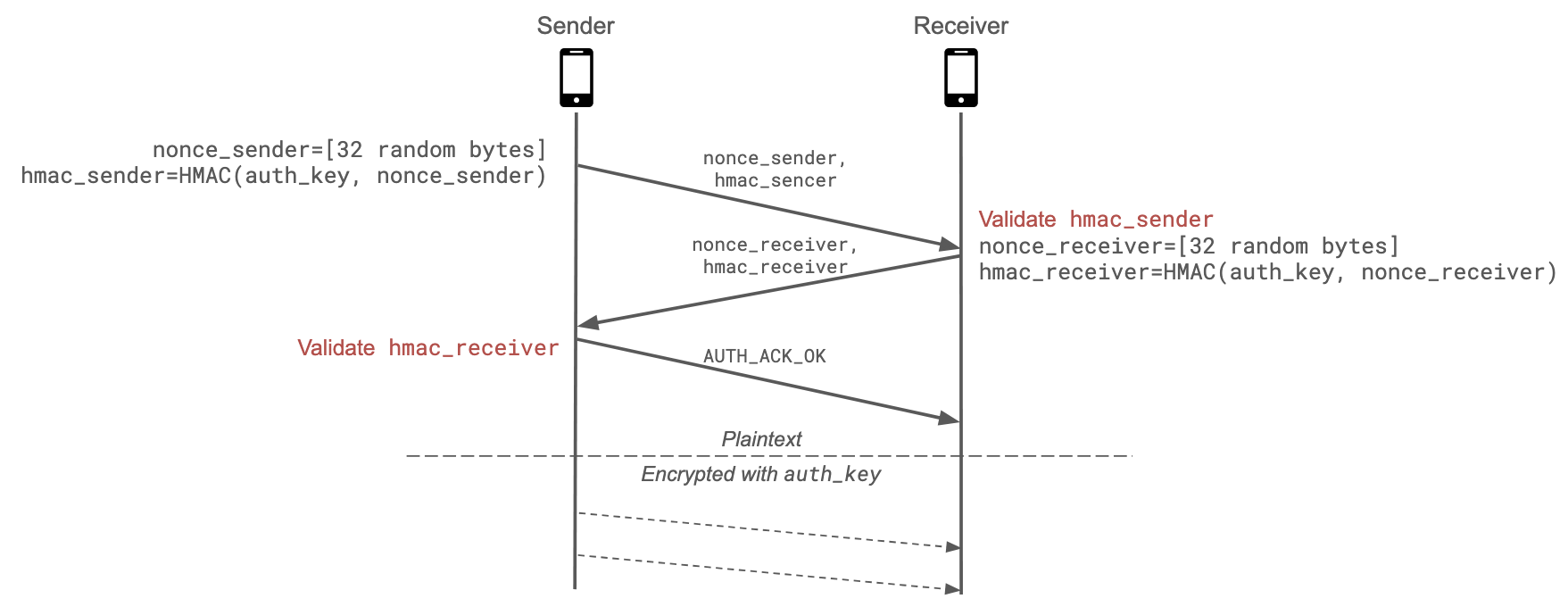
- The sender generates
nonce_sender, a random 32 bytes value, and computeshmac_sender=HMAC(auth_key, nonce_sender). - The sender sends
nonce_senderandhmac_senderto the receiver - The receiver checks the validity of
hmac_sender. If it's invalid, the transfer is interrupted. - Similarly, the receiver generates
nonce_receiverand computeshmac_receiver=HMAC(auth_key, nonce_receiver) - The sender checks the validity of
hmac_receiver. If it's invalid, the transfer is interrupted. - The sender sends an authentication acknowledgment.
If the authentication succeeds, the rest of the exchange is encrypted using auth_key. This means that if we want to complete a successful transfer without knowing the data embedded in the QR Code, we have (or at least we thought we had to...) bypass or break both the authentication and the encryption parts.
Vulnerable HMAC check
Looking more closely at the HMAC validation method, we noticed the HMAC could be easily bruteforced:
public static boolean checkHmac(String nonce, String receivedHmac, byte[] key) {
    if (key == null || TextUtils.isEmpty(nonce) || TextUtils.isEmpty(receivedHmac)) {
        return false;
    }
    String computedHmac = hmacSha256_base64(nonce, key);
    boolean isPrefix = computedHmac.startsWith(receivedHmac);
    return isPrefix;
}
The method only verifies that the HMAC provided by the other side is a prefix of the computed HMAC. The received HMAC cannot be empty due to the checks at the beginning of the method, but HMACs of length 1 are accepted. Since the HMACs are base64-encoded, we would only need to try at most 64 values. The remaining issue is that if the authentication fails due to a wrong HMAC, the entire transfer dies. We then need a way to restart the transfer as many times as necessary.
This can be accomplished using the XSS vulnerability we described earlier. The attack would work as follows:
- The very first link the victim clicks opens the Galaxy Store WebView and injects our JS script in the page
- We repeatedly restart the Smart Switch transfer with
window.location.href = "smartswitch://launch?..." - For each authentication attempt, we try a different HMAC (a char in the base64 alphabet)
Once we received a response containing the receiver's authentication values, we know that we have successfully bypassed the authentication. However, one issue remains: after authentication, both sides start encrypting the traffic. Without knowing auth_key, we cannot generate correctly encrypted payloads!
Key downgrade attack
In reality, the authentication messages contain more fields than what is shown in the diagram. They look like this:
{
  "type": "REQUEST",
  "DeviceAddr": "10.0.2.15",
  "DevicePort": 9400,
  "needAllowStep": false,
  "entryMode": "QR",
  "isRequestNewKey": true,
  "DisplayName": "myphone",
  "nonce": "AG3IL7h…qA7pbUa",
  "hmac": "3jrhGT…M=\n"
}
The entryMode field defines how the sender initiated the connection: either by scanning the QR Code ("entryMode" = "QR") or by entering the PIN ("entryMode" = "PIN"). The receiver doesn't implement a check to verify which method is used, so it happily trusts what the sender sends. However, in PIN mode the key is truncated to 3 bytes instead of 32 bytes (to reduce the number of characters the sender has to type).
By switching the mode to PIN, we reduce the size of the key to only three bytes. When the receiver sends back its authentication message, we obtain a nonce and a HMAC computed with this key, as hmac_receiver = HMAC(nonce_receiver, auth_key). We can then try all possible key values offline until we find the correct one. On our laptops, this takes less than 10 seconds.
Skipping auth completely
But can we do better? Currently, our exploit is not stealthy at all due to the authentication brute-force: the deeplink must be triggered several times, so the whole process is quite slow. After a more careful analysis, it turns out that the exploit can be simplified. First, recall that the message header contains a data type field:
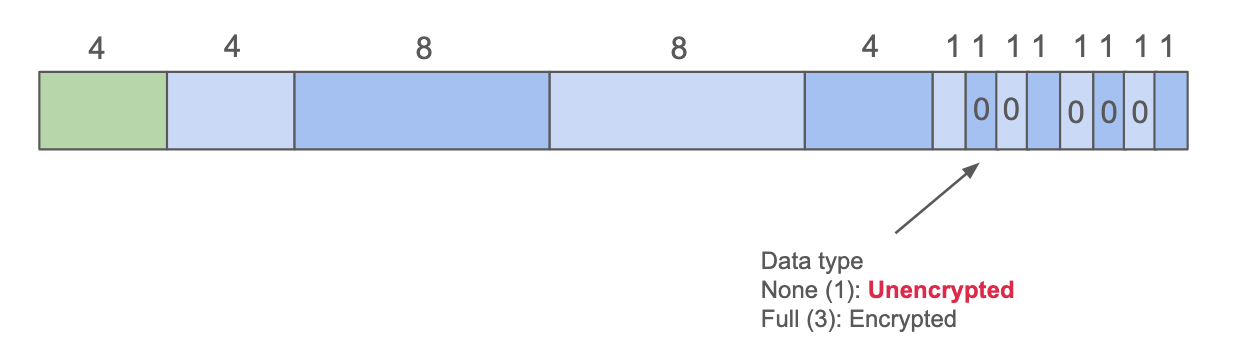
Interestingly, by simply using None instead of Full, messages are expected to be sent in plaintext rather than encrypted. As the receiver doesn't enforce encryption, the messages are accepted without issue. There is no longer any need to break the auth_key!
We also asked ourselves what would happen if no authentication was performed at all. After all, if authentication is the pain point in our exploit, why not try to skip it altogether? Not authenticating eventually triggers a timeout:
// Called when the connection is established
public final void setAuthTimeout() {
        removeMessages(200);
        sendMessageDelayed(obtainMessage(200), 40000 L); // <-- triggers the UI popup after the countdown is over
    }
But this only seemed to trigger a UI warning asking to scan the QR code again. The transfer itself is not interrupted: the socket stays open, and incoming messages are still processed. However, the receiver no longer connects back to us, as that side of the communication is established during authentication. This means that even if we can reach the receiver, the transfer will halt as soon as it tries to send a message back. Most of the time this is not an issue, but a few commands do trigger a response from the receiver. As a last resort, we tried simply ignoring these messages, hoping they were not required for the transfer to succeed:
#
# Simplified version of the replay script
#
def replay_traffic(proc):
    N = 500
    REPLAY_DATA_DIR = 'captured_packets/'
    file_list = os.listdir(REPLAY_DATA_DIR)
    pkt_expecting_response = [11, 13, 113, 121, 237, 239, 241, 243, 245]
    for i in range(N):
        if i in pkt_expecting_response: # <-- skip problematic messages
            log.info(f"skip: {i}")
            continue

        # Replay packet
        send_pkt_id(i)
And... it worked! The transfer succeeds even without these commands, and the app gets installed on the phone.
Demo
To sum up, the final exploit is much simpler and more practical than our initial version. It no longer needs to brute-force the authentication, nor to break any key. It is also quite fast: over LAN, the full APK can be pushed in less than a second. The exploit is also fairly stealthy, as only a single activity is started after the deep link is clicked. Finally, it is not limited to LAN setups and also works in P2P (Wi-Fi Direct) mode. In other words, this gives us a 1-click arbitrary APK installation over LAN or physical proximity. Here is a demo run of the exploit:
Conclusion
The full exploit is available on GitHub. Since it depends only on the local Smart Switch app, feel free to reinstall an old vulnerable version and play with it, it should work fine.
In the end, even though we did not make it to Pwn2Own, this was a fun research project. We reported the vulnerabilities to Samsung, which acknowledged them and rated the chain as critical. We were also glad to be informed that our report was the first one eligible for their Important Scenario Vulnerability Program, bringing the total bounty to $100,000. Funnily enough, this is twice what we would have received at Pwn2Own (assuming no collision), so things worked out pretty well in the end. You can read the announcements on their website, see ISVP Milestone & Update and Annual Report in 2025.
Disclosure timeline
- 22 Oct 2025 — We disclose our exploit chain to Samsung.
- 28 Oct 2025 — Samsung Mobile Security reaches out with clarification questions.
- 21 Nov 2025 — Samsung acknowledges the XSS as part of the original chain and rates it as moderate.
- 05 Dec 2025 — Samsung acknowledges the full exploit chain as critical and awards the bounty.
- 25 Feb 2026 (approx.) — Samsung fixes all vulnerabilities in the exploit chain.
- 03 Mar 2026 — Samsung publishes advisories.
- 16 Mar 2026 — The report is recognized as the first eligible submission to Samsung's Important Scenario Vulnerability Program
We will soon release another blog post on a follow-up bug chain we found in the Samsung Galaxy Store during the same period, which led to an arbitrary local APK install, so stay tuned!
We hope you enjoyed reading this article. See you soon!
Enjoyed this article? Share it with your network!